

AI Enhanced Video Editing Workflows A Practical End to End Guide for Media Production
To download this as a free PDF eBook and explore many others, please visit the AugVation webstore:
Introduction
Purpose and Scope of Operational Analysis
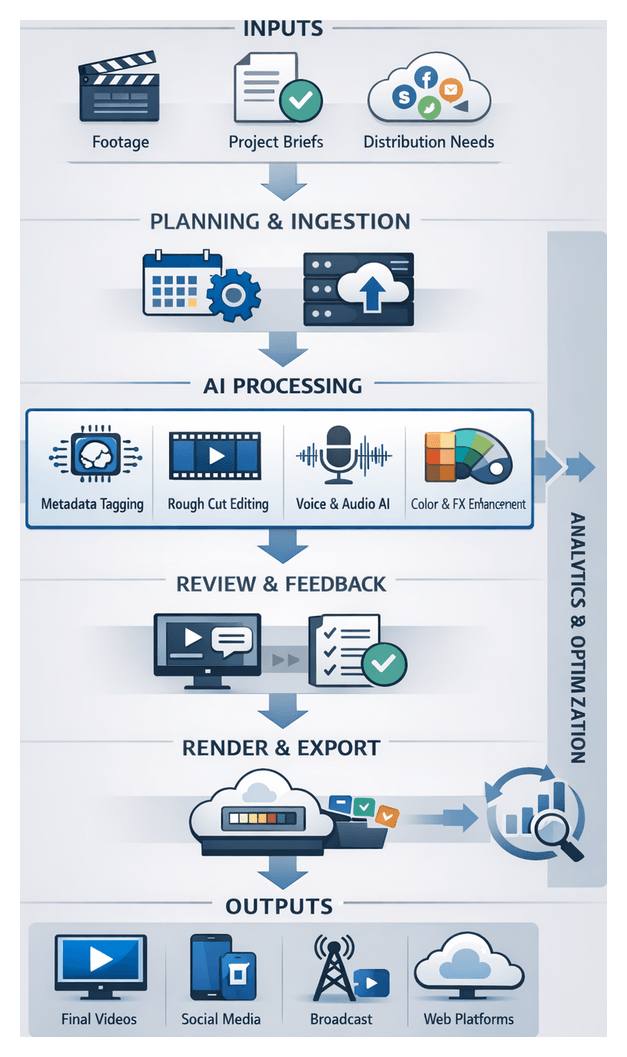
Media production teams managing dozens of videos each week face mounting pressures: tight schedules, multiple format variants, complex approval pipelines and rapid iteration cycles. This analysis establishes a clear understanding of these operational challenges—capacity bottlenecks, quality variability and delivery delays—to guide the design of an end-to-end AI-enhanced editing workflow. By defining high-volume workflows and gathering key inputs, organizations can identify critical pain points, prioritize improvements and select AI-driven tools that align with strategic objectives, accelerating time to market and ensuring consistent, scalable video production.
Defining High-Volume Video Production and Industry Trends
High-volume video production is characterized by:
- Daily or weekly release cadences spanning dozens of individual assets.
- Multiple deliverables for social, broadcast, streaming and mobile channels.
- Approval pipelines involving creative directors, compliance reviewers, brand managers and external clients.
- Rapid iteration driven by marketing campaigns, breaking news or seasonal promotions.
Key industry trends intensify these pressures:
- Platform Proliferation: Each channel imposes unique technical and creative requirements.
- Data-Driven Creativity: Analytics inform iterative edits, A/B testing of overlays and calls to action.
- Distributed Teams: Cloud-native review and asset sharing enable collaboration across time zones.
- Cost and Time Pressures: Competition and shortened attention spans demand shorter production cycles.
- Emerging AI Capabilities: Advances in computer vision, natural language processing and generative models automate repetitive tasks and assist creative decisions.
Operational Prerequisites and Environmental Conditions
Successful integration of AI-driven modules requires foundational elements:
- Baseline Process Mapping: Detailed flowcharts capturing manual steps, decision points and handoffs.
- Governance Framework: Defined roles, version control policies, escalation procedures and QA guidelines.
- Technology Infrastructure: Scalable storage, high-throughput networks, GPU-enabled servers or cloud compute instances and secure access controls.
- Data Preparation: Standardized folder structures, naming conventions, metadata schemas and format specifications.
- Stakeholder Alignment: Executive sponsorship, cross-functional working groups and change management plans.
Collecting and normalizing metrics—project counts, turnaround times, resource inventories, process documentation and tool performance logs—provides the benchmarks against which AI interventions are measured.
Coordinating Systems, Teams and Data Exchange
Modern workflows span on-set capture tools, cloud asset management platforms and AI engines. A unified orchestration layer monitors system events, triggers automated tasks and manages notifications to keep producers, editors, sound designers, colorists and compliance officers aligned.
Typical integration points include:
- Ingestion API for media uploads.
- AI Metadata Service invocation via webhooks.
- Editing Platform Connectors syncing clip bins and timelines.
- Review Platform Webhooks propagating annotations and approval statuses.
- Render Trigger APIs for batch encoding jobs.
- Analytics Endpoints streaming performance metrics to dashboards.
Automation and human-in-the-loop checkpoints ensure quality and creative oversight. Reviewers receive batch assignments with frame-accurate annotation tools, feedback categorized by severity and change requests linked to project-management systems. SLA timers escalate overdue tasks. Clear communication protocols—real-time chat alerts, scheduled stand-ups and automated reports—combined with role definitions (Media Administrator, Data Engineer, Editor, Colorist, Sound Designer, Compliance Officer and Project Manager) maintain transparency and accountability.
Robust error-handling features include automated retries with exponential backoff, fallback paths to secondary services, escalation alerts, state checkpoints and incident tracking. Elastic scaling and modular design allow AI services to run in containerized clusters, automatically provisioning resources based on demand and enabling plug-and-play integration of new capabilities.
AI-Driven Workflow Phases
Pre-Production Planning Assistance
IBM Watson ingests project briefs, performs sentiment analysis and identifies narrative beats. Resource management platforms simulate schedules and budgets in real time. Approved timelines and shot lists populate the production pipeline via metadata schemas enforced by microservices.
Automated Asset Ingestion and Normalization
Event-driven engines classify file types and invoke AWS Elemental MediaConvert for transcoding. A metadata bus records technical attributes and provenance. Automatic checksum verification and version control eliminate manual errors, while a unified catalog presents AI-suggested tags based on scene context.
Intelligent Metadata Tagging and Search
Google Cloud Video Intelligence API, Microsoft Azure Video Indexer and Amazon Rekognition perform scene detection, object recognition and speech-to-text. A graph database links clips to speakers, locations and branded elements. Human-in-the-loop reviews refine annotations, and faceted search enables rapid asset retrieval.
AI-Powered Rough Cut Generation
Tools like Blackbird match script cues with tagged assets, assembling preliminary timelines. Decision-support engines rank clip combinations by story flow and duration targets. Editors adjust low-confidence segments within integrated editing environments, while orchestration logs every transition.
Automated Voiceover Scripting and Narration
Copywriting modules suggest voiceover drafts. Upon approval, Adobe Sensei text-to-speech engines generate narration with controlled prosody. Tracks align automatically to visual cues, with versioning enabling auditions of alternative styles.
AI-Driven Color Correction and Grading
DaVinci Resolve Neural Engine applies baseline exposure corrections, creative LUTs and per-scene color matching. GPU-accelerated clusters grade multiple sequences in parallel, with feedback loops refining models based on editor preferences and performance metrics.
Enhanced Audio Processing and Sound Design
Deep-learning filters perform noise reduction, dereverberation and dialogue enhancement. Adaptive mixing algorithms balance stems to meet loudness standards. Editors preview mix adjustments in real time, and master stems carry metadata for broadcast and online platforms.
Collaborative Review and Feedback Orchestration
Frame.io centralizes draft sequences with time-coded comments. AI-driven comment analysis categorizes feedback, routes tasks to responsible roles and tracks resolution status. Real-time notifications and analytics dashboards surface recurring issues, tightening approval cycles.
Automated Rendering and Format Conversion
An intelligent render farm, leveraging BirdDog Cloud Encoder or similar services, selects optimal encoding presets. Parallel containerized jobs via AWS Elemental MediaConvert execute batch renders. Outputs are validated against platform specifications and propagated to content delivery networks.
Performance Monitoring and Continuous Improvement
Telemetry agents collect processing times, error rates and resource usage. Dashboards built on Tableau or Power BI visualize key performance indicators. AI-driven insights predict bottlenecks and recommend optimizations, while periodic model retraining incorporates annotated corrections, driving continuous workflow enhancements.
Modular Solution Architecture and Governance
The end-to-end architecture decomposes into discrete stages with well-defined inputs, outputs and data contracts. Intermediate artifacts—planning documents, asset indexes, metadata catalogs, rough-cut timelines, voiceover tracks, graded clips, audio stems, review reports and rendered deliverables—propagate intelligence and structure downstream, reducing rework and ensuring traceability.
Core system components include:
- Adobe Sensei for asset tagging and sequence assembly
- DaVinci Resolve Neural Engine for color grading
- Frame.io for collaborative review and comment triage
- Avid Media Composer for AI-assisted timeline generation
- Microsoft Azure Video Indexer and Amazon Rekognition for semantic analysis
- On-premises or cloud render farms—such as BirdDog Cloud Encoder
- Analytics dashboards via Tableau or Power BI
Governance practices—schema validation, version control, automated notifications, role-based access controls, audit trails and automated QA scripts—embed quality checks at each handoff. Containerized microservices, auto-scaling compute and plug-in frameworks ensure elastic scalability and extensibility, future-proofing investments and enabling rapid integration of emerging AI innovations without disrupting ongoing operations.
Chapter 1: Pre-Production Planning and Objective Definition
Purpose and Inputs: Defining Goals and Specifications
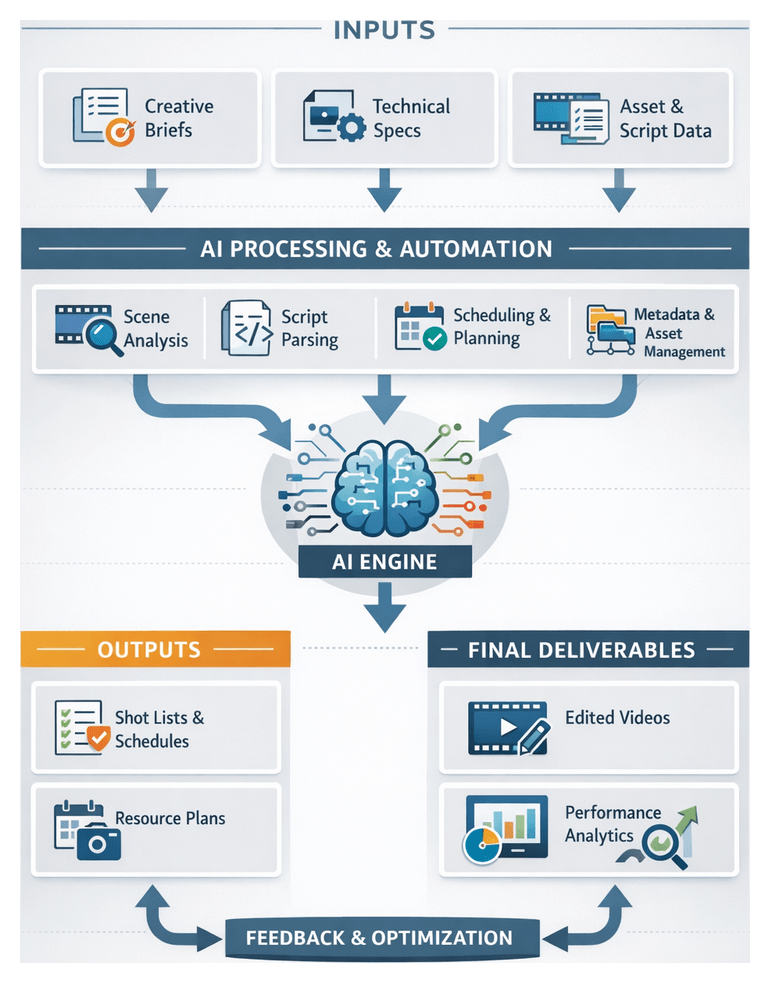
In high-volume video production, rigorous pre-production planning sets the stage for efficiency, quality and alignment among all stakeholders. This foundational phase transforms broad concepts into actionable workflows by defining creative and business objectives, technical constraints and structured inputs that guide both human teams and AI modules. Clear goals and detailed specifications ensure that automated analyses—such as scene recognition, script parsing and scheduling algorithms—operate in service of the intended narrative and operational requirements.
Three core goals drive this stage:
- Establish Creative and Business Objectives—define narrative themes, brand tone, target audience and key performance indicators such as view counts, conversion rates or engagement metrics.
- Align Technical and Operational Parameters—specify format standards, delivery channels, budget allocations, resource availability and timeline constraints.
- Prepare Structured Inputs for AI and Human Planners—collect briefs, asset inventories, metadata taxonomies and tool configurations to enable automated processing and collaborative decision-making.
By meeting these goals, teams minimize ambiguity, reduce costly rework and create a unified reference for scripting, asset ingestion and editing. In environments juggling hundreds of assets and multiple distribution platforms, this preparation is vital for maintaining consistency under tight deadlines.
Project and Creative Briefs
The project brief encapsulates business goals, audience profiles, key performance indicators and compliance requirements. Formal sign-off ensures stakeholder alignment. Platforms provide version control, approval workflows and automated reminders to secure endorsements before production begins.
The creative brief conveys brand voice, visual references, narrative outlines and editorial tone. Integration with asset management systems via Adobe Sensei accelerates alignment by tagging and surfacing relevant mood boards, color palettes and reference clips.
Technical Specifications and Resource Inventories
Technical specifications define video resolutions, aspect ratios, codec preferences, audio standards and metadata schemas. Capturing these details early prevents downstream format mismatches. AI-driven validation tools can scan draft renders to flag encoding deviations before delivery.
Resource inventories enumerate personnel, equipment, locations and budget reserves. AI-powered scheduling engines from Celoxis or monday.com recommend optimal assignments, identify bottlenecks and simulate timeline scenarios based on team availability, gear lists and procurement lead times.
Script Analysis and Governance
Scripts provided in machine-readable formats enable AI tools like ScriptBook and OpenAI’s ChatGPT to extract scene structures, character breakdowns and sentiment analysis. Controlled vocabularies for scene categories, emotional tags and object classes ensure consistent metadata for shot list generation and searchability.
A formal governance framework outlines approval workflows, change request templates and version control practices. AI-enabled platforms automate routing of edits, maintain immutable audit trails and send deadline reminders, reducing coordination friction and ensuring every decision is documented.
Prerequisites for System Readiness
- Finalized and approved briefs, specifications and taxonomies.
- Configured AI modules for script parsing, asset tagging and scheduling.
- Provisioned asset management and collaboration platforms with established folder structures and naming conventions.
- Technical infrastructure—workstations, cloud compute and network capacity—meeting AI processing requirements.
- Active governance rules and change control workflows with defined escalation paths.
Meeting these conditions creates a controlled environment in which human planning and AI automation reinforce each other, reducing miscommunication and delivery delays as production scales.
Pre-Production Workflow Sequence
A structured pre-production sequence organizes tasks, roles and system interactions from initial kickoff through formal handoff of planning deliverables. This orchestration minimizes manual coordination and leverages AI to accelerate routine analyses, maintain consistency and foster collaboration.
Kickoff Workshop and Goal Alignment
A facilitated kickoff brings together producers, directors, editors, AI specialists and clients to define vision, technical requirements and success metrics. AI-assisted transcription services such as Otter.ai capture action items, while project management platforms like Asana record tasks, milestones and dependencies.
- Define creative vision, brand guidelines and target audience profiles.
- Document deliverables, deadlines and format specifications.
- Assign roles linked to PM tasks, with AI summarizing decisions and dependencies.
Script Parsing and Shot List Generation
The finalized script is ingested into an AI parsing engine to annotate scene boundaries, characters, props and dialogue segments. Metadata outputs include estimated shot types and resource requirements. Editors review and validate annotations through a collaborative interface before proceeding.
AI shot-list generators map narrative elements to visual templates, suggesting camera angles, framing and sequencing based on historical data and style guides. Creative teams refine entries, annotate custom directions and lock versions for integration with scheduling tools.
Scheduling and Technical Preparation
With a validated shot list, AI-powered schedulers like StudioBinder or ShotFlow integrate crew availability, location constraints and scene durations to propose optimized shoot calendars. Production coordinators review conflicts, adjust assignments and lock in dates, while automated notifications alert crew and vendors.
In parallel, technical leads complete AI-augmented questionnaires on resolution, codecs and metadata requirements. Digital Production Management software auto-generates technical specifications and folder structures, ensuring consistency for subsequent asset ingestion.
Stakeholder Review and Formal Handoff
Planning deliverables—shot lists, schedules and technical specs—are uploaded to review portals such as Frame.io or Wipster. Stakeholders receive alerts, leave time-coded annotations and approve revisions. AI-driven comment aggregation highlights common feedback themes and flags critical issues, automatically generating revision tasks.
Upon approval, the system exports XML or CSV shot lists, optimized schedules, configuration documents and annotated script breakdowns into the central media asset management platform. Notifications via Slack or Microsoft Teams inform asset managers and editors that planning is complete and raw media ingestion may begin.
AI Integration Across Production and Post-Production Stages
An end-to-end AI integration embeds intelligence at every critical decision point, transforming isolated tasks into a cohesive, adaptive ecosystem. Media asset management platforms, cloud rendering farms and collaborative review systems orchestrate data exchange, enforce security policies and deliver the computational power required by advanced analytics engines.
Automated Asset Ingestion and Format Management
Upon arrival, raw media is processed by AI-powered ingestion services that detect file formats, camera metadata and audio channels, normalizing footage into standardized containers. Transcoding engines convert unsupported codecs while preserving color space and dynamic range. Integrity validation classifiers flag corrupted frames or missing audio tracks, routing anomalies for manual inspection.
- Automatic format detection and batch transcoding.
- Integrity validation and error reporting.
- Metadata extraction and cataloging.
Intelligent Metadata Generation and Search
Computer vision models identify objects, scenes and shot types. Speech-to-text modules transcribe dialogue while sentiment analysis tools assess emotional tone. This rich metadata populates searchable indexes, enabling semantic queries by character, keyword or visual attribute. Human reviewers confirm AI tags via confidence scores, refining model accuracy over time.
- Automated scene and object recognition.
- Speech transcription and sentiment tagging.
- Semantic search with faceted filtering.
AI-Powered Rough Cut Assembly
AI edit assistants align dialogue transcripts with script references, selecting matching clips and sequencing them per the narrative outline. Timing algorithms trim excess footage, generating a cohesive rough cut. Editors can compare alternative cuts, apply transition styles and teach the system their stylistic preferences, enhancing future recommendations.
Automated Voiceover Scripting and Synthesis
Natural language generation modules process narration cues and tone guidelines to craft concise voiceover scripts. Integration with Amazon Polly or Azure Text-to-Speech synthesizes narration tracks in multiple voices and languages. Editors may override or adjust timing directly within the timeline.
AI-Driven Color Correction and Grading
Platforms like DaVinci Resolve Neural Engine analyze histograms, exposure and color balance to apply baseline corrections and creative looks. Face detection and region masks preserve skin tones while style matching engines synchronize color palettes across disparate shots.
Enhanced Audio Processing and Adaptive Mixing
AI filters remove noise, isolate dialogue and apply adaptive equalization. Tools such as iZotope RX detect artifacts and apply corrective processes. Loudness normalization algorithms ensure compliance with broadcast standards while editors preview mix adjustments in context.
Collaborative Review and Feedback Orchestration
Cloud review portals support synchronized playback, time-coded annotations and real-time voting. AI comment categorization distinguishes technical, creative and compliance feedback, prioritizing critical issues and assigning tasks via integration with Frame.io. Automated reminders and escalation paths streamline review cycles across distributed teams.
- Real-time annotation and version tracking.
- AI-driven feedback categorization and prioritization.
- Automated task assignment and escalation.
Automated Rendering and Multi-Format Delivery
Rendering engines execute parallel batch encoding, with AI optimizers selecting codecs, bitrates and resolutions tailored to each delivery channel. Tools like Telestream Vantage scale rendering capacity in the cloud. Watermarking, caption embedding and compliance checks occur automatically, generating metadata manifests for distribution.
- Smart codec and bitrate selection.
- Parallelized batch encoding.
- Automated compliance checks and manifest generation.
Performance Monitoring and Continuous Improvement
Analytics engines capture metrics on task durations, resource utilization and review cycle times. Dashboards visualize bottlenecks, while predictive models forecast constraints for upcoming projects. Feedback loops retrain AI models—for example, refining color grading algorithms based on manual correction data—to drive incremental gains in accuracy, turnaround time and cost efficiency.
Plan Deliverables, Dependencies, and Handoffs
The pre-production phase delivers an authoritative suite of artifacts—briefs, specifications, schedules, shot lists and metadata schemas—that guide all subsequent production and post-production activities. Formalizing outputs, tracking dependencies and standardizing handoff protocols eliminate ambiguity and accelerate time to final cut.
Primary Outputs
- Project and Creative Briefs—narrative objectives, audience profiles, brand guidelines and performance metrics, versioned in platforms such as Frame.io.
- Technical Specification Sheet—formats, codecs, resolutions and metadata schemas that inform automated transcoding and ensure compliance with delivery standards.
- Shot List and Storyboard—scene breakdowns with timecodes, camera angles, audio cues and metadata tags generated by AI tools like Google Cloud Video Intelligence API.
- Production Schedule and Resource Plan—time-sequenced shoot calendar linked to crew, equipment and location availability, dynamically adjustable by AI schedulers.
- Risk Register and Contingency Plans—identified bottlenecks and mitigation strategies maintained in live databases for automated monitoring.
- Metadata Schema and Taxonomy Guide—controlled vocabularies expressed in XML or JSON schemas, imported into AI engines for consistent annotation.
Key Dependencies and Governance
- Stakeholder Approvals—creative, technical and compliance sign-offs tracked via automated review workflows.
- Project Management Integration—synchronization with Asana, Trello or Jira through API connectors to enforce task dependencies and status updates.
- Data Quality and Version Control—metadata validation against schemas and document history preserved in version control systems for auditability.
- Procurement Lead Times—equipment bookings, talent contracts and permits factored into the resource plan with AI-driven procurement forecasts.
- Regulatory Compliance—legal review cycles and policy checks embedded in the workflow, with outcomes recorded in the risk register.
Handoff Protocols
- Project Repository Initialization—creation of a dedicated folder in the media asset management system, with access controls and tagged deliverables.
- API-Driven Data Transfer—serialization of planning outputs into JSON packages pushed to the ingestion engine to configure transcoding profiles and folder structures.
- Notification Triggers—alerts via Slack or Microsoft Teams informing asset managers and editors that the repository and metadata guides are ready.
- Ticket Creation—generation of tasks in the production tracking system for ingesting footage, applying naming conventions and initiating metadata tagging.
- Audit Log Entries—immutable records of user or system actions, timestamps and delivered artifacts for compliance and continuous improvement.
With these planning deliverables and protocols in place, the AI-driven editing workflow proceeds seamlessly into asset ingestion, intelligent tagging and automated assembly, all aligned with the original creative vision and technical specifications.
Chapter 2: Automated Asset Ingestion and Organization
Context and Imperatives for AI-Driven Workflows
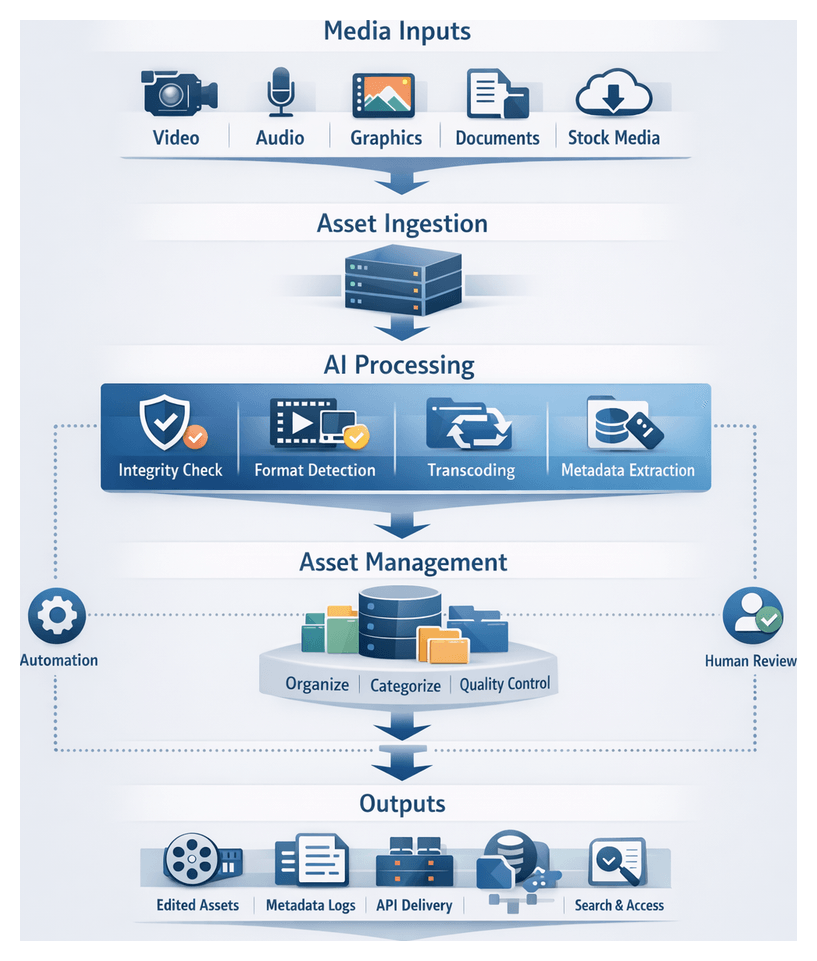
As media production scales to meet diverse delivery requirements—web, broadcast, social—AI integration at every stage is no longer optional. Intelligent services automate routine tasks, surface real-time insights, and orchestrate complex handoffs, enabling teams to maintain creative control and consistent quality. The asset ingestion stage, which consolidates raw media into a unified repository, serves as the foundation for all downstream AI-driven processes.
Asset Ingestion and Structuring
Purpose and Strategic Value
Automating asset ingestion eliminates manual overhead, enforces consistency, and provides traceability from the moment footage, audio, graphics, and ancillary assets enter the workflow. By centralizing media in normalized formats and standardized naming conventions, editors, sound designers, colorists, and stakeholders can locate, preview, and select assets rapidly. Early integrity checks, format compliance validation, and a complete audit trail mitigate risk, prevent downstream errors, and support regulatory or security requirements.
Required Inputs and Delivery Mechanisms
Effective ingestion begins with a defined set of inputs and standardized delivery pathways. Key asset categories include:
- Camera Originals: Raw sensor files or native codecs from digital cinema cameras, DSLRs, mirrorless systems, and smartphones
- Audio Recordings: Location tracks, dialogue takes, ambient sound bounces, and field mixer outputs
- Graphics and Design Elements: Motion templates, logos, lower-thirds, title animations, and images from Adobe After Effects or Illustrator
- Stock Media and Licensing Files: Third-party clips, royalty-free music, sound effects, and usage rights documentation
- Production Documents: Shot logs, camera reports, metadata spreadsheets, slate information, and continuity notes
- Auxiliary Assets: Closed captions, translation scripts, transcripts, storyboards, and animatics
Delivery mechanisms may include secure FTP/SFTP, cloud collaboration platforms such as Frame.io, direct transfer via card readers, or automated on-set backups. For remote shoots, teams must provision sufficient bandwidth or employ high-speed data shuttle services to transfer large-format files promptly.
Infrastructure and Metadata Requirements
A robust ingestion infrastructure combines high-capacity storage arrays, scalable compute nodes, and optimized network fabrics. Local SSD caches handle burst transfers, while long-term archives reside on disk or tape libraries. GPU-accelerated transcoding servers and AI inference nodes power format detection, metadata extraction, and proxy generation, leveraging solutions such as AWS Elemental MediaConvert and Amazon S3 for cloud-native workflows.
Consistent metadata schemas and naming conventions ensure automated tagging and search indexing. Essential fields—project ID, scene, take, camera angle, location, talent tags, and production dates—are agreed upon in advance. File paths and names encode these attributes, for example: PROJ123_CAMA_SC05_TK02_20260210.MOV. Automation scripts enforce these conventions, renaming files and organizing directory structures at ingest time.
Ingestion Pipeline and Orchestration
The end-to-end ingestion pipeline orchestrates interactions among watcher services, AI-driven modules, and asset management platforms. A workflow engine such as Netflix’s Conductor monitors watch folders or upload endpoints and coordinates tasks through the following sequence:
- Trigger integrity validation: compute checksums (MD5, SHA-256) and quarantine files that fail verification
- Invoke format detection: AI-enhanced engines profile codecs, frame rates, and resolutions using AWS Elemental MediaConvert or on-premise tools
- Execute parallel transcoding: generate mezzanine and proxy formats on GPU clusters or via cloud services on Amazon S3
- Extract and enrich metadata: automated technical metadata extraction and custom AI tagging through Clarifai or Google Cloud Video Intelligence
- Apply naming conventions: rename assets and organize them in a hierarchical repository reflecting project taxonomy
- Categorize assets: route video, audio, graphics, and stills to respective partitions within a media asset management system such as Adobe Experience Manager Assets or CatDV
- Perform quality control checks: automated QC tools scan for dropped frames, audio clipping, and color inconsistencies, generating alerts for any failures
- Update asset catalog: register new entries, update indexes, and notify stakeholders via Frame.io or other collaboration platforms
Human-in-the-Loop and Exception Handling
While automation accelerates bulk processing, human oversight is vital at key checkpoints. After integrity validation, technical leads review flagged errors. Editors sample proxies post-transcoding to confirm visual fidelity. Production coordinators verify metadata—project codes, usage rights, and talent releases—before assets enter the MAM. The workflow engine tracks approvals and only advances batches upon sign-off.
Exception protocols maintain throughput and transparency:
- File Corruption: Quarantine corrupted files, log errors, and alert staff for re-transfer
- Metadata Mismatch: Flag conflicts between AI-extracted values and schema definitions for manual reconciliation
- Transcode Failures: Automatically retry failed jobs; escalate persistent errors with links to logs and source files stored on Amazon S3 or network volumes
Integration with chatOps channels (Slack, Microsoft Teams) and project management systems (Jira, Asana) ensures rapid response to interruptions.
Scalability, Performance, and Monitoring
To sustain peak workloads in high-volume environments, ingestion systems employ:
- Auto-Scaling Transcoding Clusters: Containerized media servers add GPU or CPU nodes under load
- Distributed File Systems: Parallel read/write capabilities reduce I/O contention
- Batching Strategies: Micro-batches for small assets and dedicated tasks for large masters
- Priority Queues: Preemptive pipelines for urgent assets like breaking news
Continuous monitoring dashboards aggregate performance metrics—queue times, error rates, throughput—and drive process refinements. Analytics engines recommend adjustments, such as retraining AI models or reallocating compute resources, maintaining optimal efficiency over time.
Traceability, Outputs, and Handoffs
Comprehensive audit trails record every action—file transfers, transcoding events, metadata edits—with immutable logs of hashes, timestamps, and user or AI-agent identifiers. Key outputs include:
- Structured Asset Repository: High-resolution masters and proxy derivatives organized by media type and scene identifiers
- Machine-Readable Manifests: JSON or XML files listing asset attributes and CSV reports summarizing batch imports
- Embedded and Sidecar Metadata: Core fields within files and sidecar XMP or JSON files with operator notes and ingest timestamps
- Transcoding and QC Logs: Success and and AWS Elemental MediaConvert
- Access Control Settings: Role-based permissions configured in Frame.io or Azure Media Services
These deliverables feed directly into intelligent metadata tagging and search pipelines. Handoff protocols include:
- API-Driven Transfers: POST sidecar metadata to Google Cloud Video Intelligence or IBM Watson Video Enrichment via RESTful endpoints
- Index Synchronization: Populate ElasticSearch or Solr clusters and update collaborative platforms like Frame.io and Wipster for immediate browsing
- Notifications and Task Assignments: Automated alerts in Jira or Asana and messages in Slack or Teams summarizing ingest batches and linking to asset dashboards
- QA and Approval Gates: Validation points where QA teams confirm proxy fidelity and metadata completeness before downstream processing
- Fallback Mechanisms: Retry logic for failed transfers and escalation paths to media engineers or production managers
By meticulously defining prerequisites, orchestrating AI-driven tasks, and formalizing outputs and handoffs, media teams build a transparent, auditable, and scalable foundation for all subsequent editing, tagging, and delivery processes.
Chapter 3: Intelligent Metadata Tagging and Search
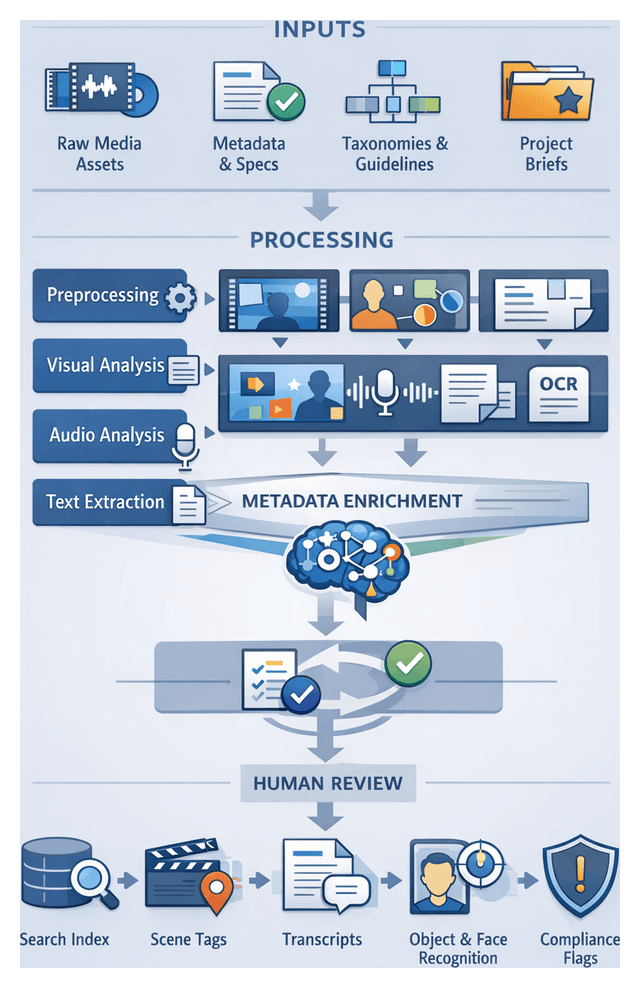
In high-volume video production environments, transforming unstructured media into richly annotated, searchable resources is essential for accelerated editing, review, and delivery. By extracting descriptive, contextual, and technical metadata—such as scene boundaries, spoken dialogue, visual objects, facial appearances, and motion attributes—teams can locate, retrieve, and assemble content with precision and speed. Leveraging AI-driven pipelines reduces manual tagging bottlenecks, enforces consistency, and maintains compliance with organizational taxonomies and branding guidelines.
The objectives of this stage are threefold:
- Accurate Identification: Detect and label visual and auditory elements within each asset to support refined search queries.
- Contextual Enrichment: Map raw detection outputs to higher-level concepts, themes, and project-specific taxonomies aligned with narrative goals.
- Searchability and Accessibility: Index annotated assets in a media asset management or content management system that offers intuitive discovery interfaces.
Required Inputs
- Raw Media Assets
- High-resolution video files (MP4 with H.264/H.265) and isolated or embedded audio tracks.
- Auxiliary files such as still images, graphics, subtitles, and closed-caption files.
- Preliminary Metadata and Technical Specifications
- File naming conventions, ingestion logs, media checksums, and existing metadata fields (project ID, scene number, shoot date).
- Taxonomy Definitions and Style Guides
- Hierarchical subject structures, controlled vocabularies, keyword lists, and guidelines on terminology, language preferences, and sensitivity flags.
- Project Briefs and Creative Directives
- Narrative descriptions, brand attributes, audience targets, compliance requirements, and usage rights.
- AI Service Endpoints and Model Configurations
- Credentials and API endpoints for services such as Google Cloud Video Intelligence API, Amazon Rekognition, and Azure Video Indexer.
- Parameters for object detection thresholds, speech transcription models, and facial recognition criteria.
Prerequisites and System Conditions
- Asset Ingestion and Organization: Assets ingested into the MAM/CMS with validated integrity, normalized formats, and prescribed folder structures.
- Compute and Network Infrastructure: GPU-enabled inference servers or cloud quotas, optimized network bandwidth, and storage I/O for large media streaming.
- Data Governance and Compliance: Role-based access controls, audit trails, and privacy checks (GDPR, CCPA) for face and voice recognition.
- User Roles and Review Workflows: Metadata curators for verifying AI outputs, with human-in-the-loop feedback mechanisms to refine model performance over time.
Operational Dependencies
- Upstream: Pre-production documentation and ingestion logs that inform scene detection and supply baseline metadata.
- Downstream: Rough cut modules, voiceover scripting engines, and content recommendation systems that consume structured metadata.
Tagging and Indexing Workflow
The metadata tagging process unfolds through a coordinated sequence of phases that combine scalable AI analysis with targeted human validation. An event-driven architecture using workflow engines (for example, AWS Step Functions or Azure Durable Functions) and message queues (Amazon SQS or Google Pub/Sub) orchestrates tasks from ingestion to searchable index provisioning.
Phase 1: Asset Queueing and Preprocessing
Ingested files trigger a preprocessing routine that verifies integrity, extracts technical metadata (codec, resolution, duration), applies naming conventions, and assigns unique identifiers. A media validation service rejects or flags corrupt files, while message queues buffer tasks and distribute workloads across compute resources.
Phase 2: Automated Visual Analysis
Computer vision services such as Amazon Rekognition, Google Cloud Vision, and Clarifai perform scene detection, object recognition, and shot boundary identification. Results are consolidated by a microservice that aligns overlapping outputs, resolves conflicts via confidence thresholds, and formats aggregated data as JSON records.
Phase 3: Automated Audio Analysis
Speech transcription and acoustic classification engines—including AWS Transcribe, Google Cloud Speech-to-Text, and IBM Watson Speech to Text—process audio segments. Transcripts with timecodes, sentiment scores, and named entities enrich the metadata, while anomalies such as noise dominance are flagged.
Phase 4: Textual Content Extraction
Optical character recognition via Google Cloud Vision OCR or Azure Computer Vision extracts on-screen text from key frames. A metadata ingestion service maps custom fields from shoot logs and user notes into a unified schema.
Phase 5: Metadata Aggregation and Enrichment
An enrichment engine unifies visual labels, transcripts, and OCR results into comprehensive records. Entity resolution links detected items to knowledge graphs or brand registries, while custom models infer scene genres and sentiments. Outputs conform to standards such as IPTC or XMP.
Phase 6: Human-in-the-Loop Validation
Low-confidence tags are queued in annotation platforms like Frame.io for expert review. Editors correct misidentifications and enhance context. Feedback loops capture corrections for model retraining, improving future accuracy.
Phase 7: Indexing and Search Provisioning
Validated metadata is ingested into search engines such as Elasticsearch or Apache Solr. Custom analyzers support full-text queries, faceted navigation, and timecode retrieval. Search APIs enable editors to query by keywords, category, or production attributes, returning thumbnails with linked timecodes and confidence metrics.
Integrating AI Across Production Stages
Embedding AI throughout the production lifecycle ensures seamless connectivity from planning to delivery. Each stage benefits from specialized engines and cloud services that automate complex tasks, enhance consistency, and accelerate creative workflows.
Pre-Production Planning
NLP models analyze scripts and briefs to generate shot lists and storyboard outlines. Platforms like Adobe Sensei identify narrative structures and visual themes, while resource-planning engines forecast equipment and staffing needs based on historical project data.
Asset Ingestion and Normalization
AI-driven ingestion tools validate, transcode, and embed technical metadata. Services such as AWS Elemental MediaConvert and media asset management systems like Avid MediaCentral enforce standardized naming and format conventions.
Rough Cut Generation
Machine learning aligns tagged assets with script cues to assemble preliminary sequences. Embedding services from OpenAI recommend clip ordering and transitions, producing a structured rough cut for creative refinement.
Voiceover Scripting and Narration
Language models adapt dialogue to brand voice, and text-to-speech engines such as OpenAI’s audio models generate narration in multiple languages. Audio is synced automatically to timelines, reducing reliance on studio bookings.
Color Grading and Look Matching
The DaVinci Resolve Neural Engine analyzes footage histograms and reference images to suggest exposure, white balance, and stylized LUTs. Automated grades maintain visual continuity across shots with minimal manual intervention.
Audio Enhancement and Sound Design
AI filters in tools like iZotope RX perform noise reduction, dereverberation, and adaptive mixing. Models suggest effect placements and ambient textures based on scene context, delivering polished stems ready for mastering.
Collaborative Review and Feedback
Platforms such as Frame.io aggregate comments using machine learning to categorize feedback by theme and priority. Automated notifications and sentiment analysis streamline approval cycles and maintain audit trails.
Rendering and Format Conversion
Smart encoding pipelines in AWS Elemental MediaConvert select optimal codecs and bitrates for each distribution channel, adjust compression dynamically, and inject metadata and watermarks according to delivery requirements.
Performance Monitoring and Continuous Improvement
AI dashboards track KPIs—edit turnaround times, review latencies, and resource utilization. Predictive models forecast capacity constraints, and retraining pipelines leverage human corrections to refine AI accuracy over successive projects.
Outputs and Deliverables
- Enriched Metadata Records: Scene descriptors, object and face labels, sentiment annotations, transcripts, and speaker IDs organized within hierarchical taxonomies.
- Scene Boundary Maps: Timecode markers for scene transitions, shot angles, and frame-accurate retrieval.
- Speech-to-Text Transcripts: Word-level transcripts with timestamps for closed captions and narrative analysis.
- Confidence Scores and Quality Metrics: Reliability indicators for each annotation and flags for human review.
- Visual Thumbnails with Overlayed Tags: Keyframe snapshots annotated with principal metadata for rapid browsing.
- Object Tracking Data: Temporal motion paths and spatial coordinates for advanced editing functions.
- Compliance Flags: Automated detection of restricted content for legal and policy review.
- Inter-Asset Relationship Graphs: Linked assets such as B-roll alternatives and multi-camera angles for contextual navigation.
Dependencies and Handoff
Essential Dependencies
- Completed Ingestion and Normalization: Verified and standardized media files.
- Pretrained and Custom Models: Access to services like Amazon Rekognition, Google Cloud Video Intelligence, and custom domain-specific models.
- Defined Taxonomy and Schemas: Controlled vocabularies, hierarchical structures, and naming conventions.
- Compute and Storage Infrastructure: GPU-enabled processing and resilient search stores (Elasticsearch or Apache Solr).
- Identity and Access Management: Secure role-based controls and enterprise single sign-on.
- Human Review Workflows: Dashboards and annotation tools for curator validation.
- API and Integration Endpoints: RESTful or GraphQL interfaces for downstream applications.
- Version Control and Change Management: Protocols for updating models and schemas without disrupting consumers.
Handoff to Downstream Systems
- Rough Cut Tools: API or flat-file delivery of shot lists, timecodes, and confidence thresholds for sequence assembly.
- Editing Interfaces: Search panels within NLE environments for drag-and-drop access to tagged thumbnails.
- Voiceover and Subtitling: Timestamped transcripts for text-to-speech engines and closed-caption file generation.
- Color Grading and VFX: Taxonomy-driven shot grouping and object masks for consistent grading and effects work.
- Review Platforms: Time-indexed comment threads and metadata-filtered feedback dashboards.
- Compliance Systems: Legal review queues for flagged assets with audit logs of detections and validations.
- Analytics and Monitoring: Metrics on indexing throughput, tag distribution, and review latency for continuous optimization.
- MAM and Distribution: Synchronization of the searchable index with Media Asset Management systems and delivery manifests.
- Retraining Pipelines: Feedback loops capturing curator corrections to improve AI models over time.
By consolidating intelligent metadata tagging, event-driven workflows, AI integrations across production stages, and clear dependencies and handoff mechanisms, media teams achieve a scalable, end-to-end ecosystem. This foundation enables precise asset discovery, rapid rough cut assembly, accelerated voiceover and color workflows, and continuous model improvement for high-quality video production at scale.
Chapter 4: AI-Powered Rough Cut Generation
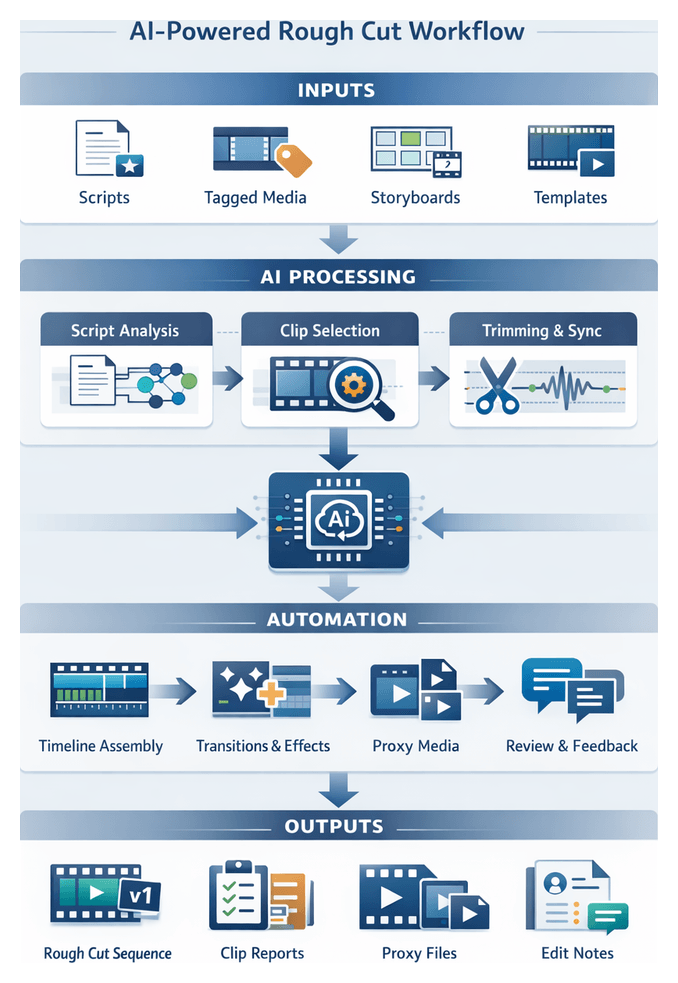
In high-volume media production environments, the initial assembly of raw footage into a coherent narrative sequence often represents a significant time sink. AI-Powered Rough Cut Generation automates clip selection, ordering, and basic trimming by analyzing script cues, asset metadata, and visual patterns, reducing first-pass editing from days to minutes. This stage serves as the foundation for creative refinement, ensuring consistency across projects and enabling editors to focus on storytelling rather than technical setup.
Integrating machine learning models trained on annotated footage with natural language processing of shooting scripts and similarity search for visual and audio content enables AI-driven tools to produce a structured preliminary edit that maintains narrative intent. These automated outputs create a standardized baseline featuring transitions, branding elements, and proxy media, significantly speeding up downstream workflows like color grading, sound design, and collaborative review. This approach delivers a dependable, scalable solution that meets the rapid turnaround demands of news, marketing, and episodic production while offering quantifiable quality metrics for ongoing enhancement.
Inputs, Prerequisites, and Technical Requirements
Required Inputs and Data Sources
- Script Documents: Finalized shooting scripts or dialogue transcripts in formats like Final Draft or Fountain, containing scene descriptions, dialogue lines, and timing notes.
- Tagged Media Assets: Video clips, audio files, and graphics enriched with metadata—scene numbers, character names, shot types, key objects, emotional tone—produced during Intelligent Metadata Tagging.
- Editing Templates and Brand Guidelines: Predefined sequence presets specifying track organization, transition defaults, color palettes, graphic overlays, and pacing parameters aligned to corporate identity.
- Timecode and Synchronization Data: Metadata establishing audio/video sync for multi-camera shoots, imported via tools such as Avid ScriptSync or built-in features in Adobe Premiere Pro.
- Reference Storyboards or Animatics: Visual guides that inform shot order and composition, enhancing the AI’s ability to align media to narrative beats.
Key Prerequisites
- Metadata Completeness: At least 95% of assets tagged with required fields—scene, take, shot type, semantic labels—to prevent sequence gaps or misordered clips.
- Consistent Naming Conventions and Folder Structures: Uniform schemes enable automated grouping and retrieval of related assets without manual intervention.
- Script-Asset Alignment Verification: Dialogue transcripts linked to media timecodes with over 98% accuracy, aided by services like Adobe Sensei speech-to-text alignment.
- Template Configuration Review: Sample footage tests to validate track counts, transition presets, and title placeholders prior to full assembly.
- Compute Resource Availability: GPU-accelerated nodes or cloud instances, as required by engines like Blackbird’s TrimInterface, to avoid delays in large-scale processing.
- Stakeholder Sign-Off: Alignment on pacing guidelines, version strategy, and approval criteria to minimize rework.
Technical and Organizational Requirements
- Centralized Media Asset Manager: A DAM/MAM platform such as Avid MediaCentral for scalable media retrieval via API.
- AI Model Configuration and Version Control: Project-specific settings for documentary, marketing, broadcast, or social media applications, with rigorous tracking of model parameters.
- User Authentication and Access Control: Role-based permissions and single sign-on integration to secure templates, metadata, and sequence files.
- Data Governance Policies: Guidelines on media retention, metadata editing, and cut ownership to prevent conflicts in collaborative workflows.
- Integration with Review Platforms: Direct handoff of rough cuts into collaborative tools—such as Frame.io or Wipster—for immediate feedback cycles.
Automated Workflow for Sequence Assembly
Scene Extraction and Script Parsing
- Script Ingestion: Upload scripts (PDF, DOCX, FDx) to the orchestration layer, normalize text, and convert to structured JSON with scene numbers, slug lines, and timecode hints.
- Scene Segmentation: Use an NLP engine—based on models like OpenAI GPT-4 or Vertex AI—to identify slug lines, dialogue blocks, and actions, tagging each scene with a unique identifier and estimated duration.
- Metadata Enrichment: Extract thematic tags (for example, “testimonial,” “demo,” “interview”) to guide subsequent asset matching.
- Event Notification: Emit completion events via Apache Kafka or AWS EventBridge, providing links to parsed JSON in the asset repository.
Asset Matching and Clip Selection
- Metadata Query Assembly: Construct search queries combining script tags—location, subject, action—with Boolean filters for resolution, frame rate, and color profile.
- Similarity Search Invocation: Invoke AI embedding services—such as Adobe Sensei or custom vector engines—to compare scene descriptors against precomputed clip embeddings.
- Candidate Review: Present top-ranked clips for editor approval or rejection; adjust thresholds or expand search parameters as needed.
- State Update: Write approved asset IDs and in/out points to the project database and notify the trimming module via REST API or messaging events.
Automated Trimming and Synchronization
- Initial Trim Application: Extract start/end times from script cues and speech transcripts to define rough clip boundaries.
- AI Boundary Refinement: Analyze visual and audio signals to adjust trim points for natural pauses and continuity, using video frameworks like FFmpeg.
- Keyframe Alignment: Snap cut points to nearest keyframes and apply crossfades to preserve timing integrity.
- Proxy Generation: Create low-resolution clips for rapid preview, linking to high-resolution masters for final conforming.
- Error Handling: Retry failed trim jobs with alternate parameters or notify editors for manual intervention.
Timeline Assembly and Template Integration
- Template Selection: Choose a timeline template based on content type, target platform, and runtime requirements.
- Automated Clip Placement: Insert trimmed clips in scene order, assign tracks, apply default audio levels, and enforce transition styles.
- Branding Overlays: Populate opening animations, lower thirds, and end credits from the design asset library via integrations.
- Version Control: Commit the assembled timeline as “RoughCut_v1,” recording template identifiers and change descriptions for branching.
Interactive Adjustments and Handoff
- Proxy Timeline Review: Editors import the proxy timeline into NLEs like Adobe Premiere Pro or Avid Media Composer, relinking to high-resolution sources as needed.
- Real-Time Collaboration: Use cloud plugins for simultaneous viewing, annotation, and timecoded comments; AI aggregates feedback by type and priority.
- Iterative Refinement: Capture edit deltas and update downstream modules—color grading, audio mixing—through the orchestration layer.
- Downstream Triggering: Upon approval, initiate workflows for voiceover integration, color correction, and final audio processing, carrying metadata tags forward.
- Status Dashboard: Display assembly progress, review feedback, and handoff readiness with automated alerts for project managers.
AI Capabilities and Supporting Systems
Core Editing Algorithm Functions
- Clip Selection and Ranking: Analyze metadata attributes—scene descriptions, recognized faces, spoken keywords, visual sentiment—using services like Google Cloud Video Intelligence API or Microsoft Azure Video Indexer to assign relevance scores.
- Automated Trimming and Timing: Employ deep learning to detect natural shot boundaries, action peaks, and pauses, predicting optimal in/out points.
- Sequence Ordering: Use transformer-based NLP to interpret script segments and align clips to narrative arcs, adjusting pacing with transitional shots.
- Transition Suggestion: Recommend fades, crossfades, or hard cuts by analyzing color profiles and motion vectors, integrating with Adobe Sensei style-transfer.
- Audio-Visual Synchronization: Align separate audio tracks using waveform comparison and timecode metadata via tools like AWS Elemental MediaConvert.
- Style and Tone Matching: Apply machine learning classifiers trained on stylistically rated footage to maintain consistent mood labels—”energetic,” “dramatic,” “informational.”
Supporting System Roles
- Metadata Repository: Centralized NoSQL index (for example, Elasticsearch) for fast retrieval and update of clip attributes.
- AI Inference Engine: Containerized microservices hosting ranking, trimming, and assembly models on GPU clusters.
- Orchestration Layer: Workflow manager (Apache Airflow or Kubernetes) coordinating service execution and exposing REST APIs.
- User Interface and Dashboard: Front-end for configuring algorithm parameters, reviewing timelines, and providing feedback; integrates with Frame.io for annotation and version control.
- Feedback Loop: Logs editor adjustments to retrain models on real usage patterns.
- Security and Access Control: Enterprise authentication and role-based permissions to safeguard assets and processes.
Human-in-the-Loop Governance and Scalability
- Adjustable Confidence Thresholds: Editors define minimum scores for automatic inclusion, flagging low-confidence clips for manual review.
- Interactive Timeline Editing: Standard NLE interfaces for rearranging, trimming, or replacing clips with metadata updates in real time.
- Automated Change Logging: Transparent logs of all manual edits for quality audits and model retraining.
- Template and Style Overrides: Policy engine enforces custom rules—maximum shot length, preferred transitions—during assembly.
- Containerized Deployment and Hardware Acceleration: Dynamic scaling of AI services across on-premise or cloud GPU/TPU clusters.
- Asynchronous Processing and Caching: Non-blocking job handling with intelligent reuse of intermediate results to optimize throughput.
- Quality Metrics and Dashboards: Automated checks for shot rhythm, scene completeness, and sync accuracy; real-time visualization of performance and error rates.
- Continuous Model Retraining: Scheduled cycles incorporating fresh editor feedback to refine algorithm behavior.
Outputs, Dependencies, and Handoff Protocols
Primary Outputs
- Preliminary Timeline Sequence: Export your project in standard formats such as Adobe Premiere Pro XML and Avid AAF. This process includes clearly defined scene boundaries and transitions, ensuring a seamless handoff for further editing or review.
- Clip Selection Report: Indexed listing of media clips used, timecode in/out points, metadata references, and AI confidence scores.
- Metadata Enhancement Log: Records of tags and markers added during assembly—emotional tone flags, pacing notes, keyword timestamps.
- Proxy Media Pack: Low-resolution proxy files named to link seamlessly with original masters for review and conforming.
- Automated Notes File: Text or JSON capturing AI-generated editorial annotations, narrative flow gaps, and script-visual inconsistencies.
Key Dependencies
- Validated Script and Cue Sheet: Finalized, time-aligned text with clear scene descriptions and dialogue references.
- Comprehensive Metadata Index: Up-to-date repository of object labels, facial IDs, transcripts, and segmentation data.
- Standardized Templates: Current sequence presets defining pacing rules, transitions, and title placements.
- AI Model Configuration and Versioning: Specific weights, thresholds, and scoring functions under strict version control.
- Compute Resource Allocation: Adequate GPU or cloud compute capacity to process large media batches without bottlenecks.
- Project File Export and Registration: Auto-ingest sequences into the asset management platform, tagging with generation metadata and version history.
- Proxy Linkage: XML mappings or EDLs linking proxy media to high-resolution masters for seamless resolution switching.
- Review Platform Integration: Upload curated previews to Frame.io or Descript, complete with timecode annotations and playback controls for stakeholders.
- Notification and Task Generation: Dispatch workflow tasks to sound design, color grading, and VFX teams via project management tools or proprietary engines like Blackbird.
- Quality Assurance Checkpoints: Automated scripts verify sequence integrity—media references, template placeholders, metadata consistency—and flag issues for correction.
By uniting precise inputs, robust AI capabilities, and structured handoff mechanisms, the AI-Powered Rough Cut Generation stage transforms the initial edit process into a predictable, high-throughput operation. This foundation unlocks accelerated creative refinement, consistent quality, and measurable improvements across every phase of video production.
Chapter 5: Automated Voiceover Scripting and Narration
Purpose and Benefits of Automated Voiceover Production
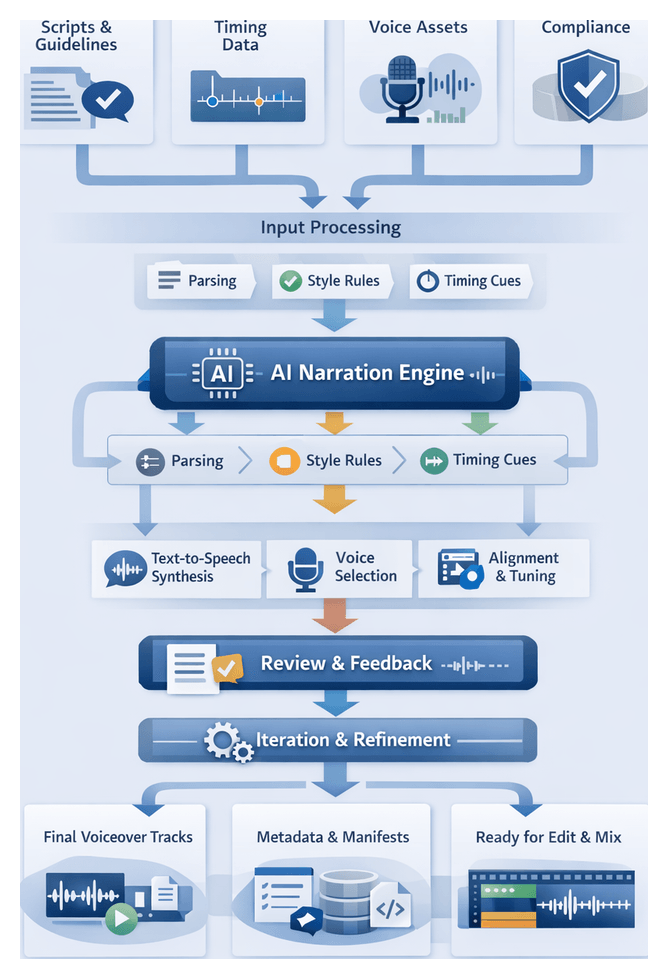
The Automated Voiceover Scripting and Narration stage transforms a picture-locked rough cut into a final audio mix by integrating AI-driven script adaptation, style consistency, and text-to-speech generation. This approach standardizes tone, accelerates turnaround, and reduces dependency on scarce voice talent scheduling. Media teams achieve consistent narrative delivery across multiple videos and languages, rapid script iteration with immediate audio previews, scalable access to diverse voice profiles, dynamic pacing for regional audiences, and improved alignment between narration and visuals, minimizing ADR cycles. By freeing creative and technical teams from manual audio tasks, automated voiceover production enhances both quality and efficiency.
Prerequisites and Essential Inputs
Before engaging AI-driven narration tools, projects must supply accurate, approved materials and clear guidelines. Essential inputs fall into four categories.
Script and Style Guidelines
- Finalized Source Text: Approved script with annotations for scene breaks, emphasis, and pauses.
- Segmented Dialogue Blocks: Discrete script segments mapped to rough cut timeline cues.
- Alternate Variations: Translations or tone adjustments for multilingual or multi-voice versions.
- Brand Voice Profile: Style guide detailing emotional tone, pacing, vocabulary preferences, and prohibited language.
- Audience Persona: Demographic and cultural context informing accent strength, formality level, and speech rate.
Timing and Technical Data
- Locked Picture Cut Reference: Time-coded export (EDL or AAF) establishing exact segment durations.
- Metadata Timing Cues: Scene markers, subtitle timestamps, and visual event triggers for AI pacing adjustments.
- Buffer and Overlap Parameters: Defined lead-in and lead-out times for natural breathing and smooth transitions.
Voice Assets and Infrastructure
- Synthetic Voice Models: Pre-trained voices from Amazon Polly, Azure Cognitive Services Text-to-Speech, or Google Cloud Text-to-Speech, selected by language, persona, and neural quality.
- Recorded Talent Files: Approved actor recordings with metadata for speaker, language, and recording conditions.
- Audio Calibration Profiles: Reference samples defining loudness (LUFS), EQ curves, and dynamic range for AI normalization.
- API Credentials: Valid keys for TTS and audio processing platforms with adequate quotas and permissions.
- Audio Editing Environment: DAW templates, such as Adobe Audition session files, preconfigured for automated import of voice tracks.
Legal, Compliance, and Localization
- Rights and Clearances: Licensing agreements for synthetic and third-party voice assets.
- Accessibility Standards: Closed-caption accuracy, audio description requirements, and translation mandates.
- Privacy Policies: Data handling guidelines for voice prints and biometric models, ensuring compliance with regulations.
- Translation Memory and Glossaries: Approved brand terminology and technical jargon repositories for consistent localization.
AI-Driven Workflow Process
The integrated workflow combines automated tasks and human oversight to convert scripted text into synchronized voiceover tracks. Coordination is managed by an orchestration layer that interfaces with AI services, asset repositories, and editing platforms.
Script Ingestion and Refinement
- Parsing and Segmentation: AI ingests the approved script, identifies scene markers and timing cues, and divides text into manageable segments.
- Language Normalization: Modules normalize abbreviations, numbers, and technical terms to ensure accurate pronunciation.
- Style Enforcement: AI references brand voice profiles to adjust tone, pacing, and vocabulary using services like the text transformation API in Amazon Polly or Google Cloud Text-to-Speech.
- Prosody Markup: Punctuation and emphasis tags are inserted to guide TTS engines on pauses and inflection.
Human Review and Voice Selection
- Editorial Approval: Editors review refined text in a side-by-side interface, accepting or rejecting AI suggestions and adding pronunciation notes.
- Voice Catalog Query: System queries voice asset management for attributes such as gender, age, and accent.
- Voice Previews: Short samples are generated via tools like Descript Overdub or ElevenLabs Voice Lab to validate emotional inflection.
- Configuration Lock-In: Chosen voice models are registered in the rendering configuration to ensure consistency across segments.
Text-to-Speech Generation and Synchronization
- Batch API Requests: Segments are batched and submitted to TTS engines—such as Amazon Polly, Azure Cognitive Services Text-to-Speech, Google Cloud Text-to-Speech, Murf AI, or Replica Studios—optimizing throughput and handling rate limits.
- Error Handling: Transient failures are retried automatically; persistent errors escalate to audio engineers.
- Asset Ingestion: Generated audio files are validated, renamed by project ID and segment, and ingested into the media asset repository.
- Project files or XML exports: for Adobe Premiere Pro and Avid Media Composer now include updated voice clips and waveform proxies, enhancing the editing process with accurate audio representations. This integration allows editors to synchronize visuals with precise audio cues, streamlining the workflow and improving overall project quality.
- Alignment Module: AI analyzes video keyframes and speech boundaries to adjust offsets, crossfades, and fade-in/out markers, tagging segments requiring manual adjustment.
Iteration and Quality Control
- Feedback Interface: Editors mark segments for tone, pacing, or wording changes, which the orchestration engine queues for reprocessing.
- Automated Refinement: Targeted updates regenerate audio, reattach clips, and update metrics on revision counts and turnaround times.
- Quality Assurance: Automated checks flag clipping, silence gaps, and prosody anomalies; human reviewers verify pronunciation, pacing variance, and emotional resonance against style guides.
System Orchestration and Scalability
- Workflow Engine: Tasks are sequenced via a message bus and orchestrated using AWS Step Functions or Google Cloud Workflows.
- Model Serving: Containerized services using BentoML or Kubeflow coordinate TTS and refinement modules.
- Auto-Scaling: Compute resources adjust based on queue depth to meet SLAs for high-volume production.
- Monitoring and Alerts: Dashboards track synthesis latency, system utilization, and error rates, alerting administrators to anomalies.
Core AI Capabilities
This stage relies on specialized AI modules that convert text into expressive, brand-aligned audio, integrated seamlessly within the production ecosystem.
Text-to-Speech Engines
- Neural Synthesis: Platforms like Google Cloud Text-to-Speech, Amazon Polly, and Azure Cognitive Services Text-to-Speech use deep neural networks for artifact-free audio.
- Pronunciation Accuracy: Grapheme-to-phoneme converters and custom lexicons ensure correct rendering of technical terms and proper nouns.
- Batch Processing: APIs support large volumes of text, returning audio files tagged with timing metadata for precise timeline alignment.
Style Transfer and Emotion Control
- Voice Embedding: Tools like Descript Overdub and Replica Studios capture vocal characteristics to mimic specific styles.
- Adaptive Tokens: Parameters adjust warmth, energy, and clarity at the sentence level without retraining.
- Emotion Modeling: Services such as IBM Watson Text to Speech analyze sentiment cues and apply prosody adjustments for emotional inflection.
Phoneme-Level Customization
- Forced Alignment: Algorithms match synthetic speech to video frames, generating viseme data for character animation.
- Custom Lexicons: Domain-specific vocabulary and multilingual transitions maintain lip-sync accuracy.
- Tool Integration: Outputs feed directly into Adobe Premiere Pro, Unreal Engine, or animation pipelines, reducing manual keyframe work.
Integration and Quality Assurance
- Media Asset Management: Scripts, voice profiles, and audio tracks are versioned and stored in centralized repositories.
- NLE Plugins: Editors invoke AI services from the timeline to preview and import approved voice tracks without context switching.
- Human-in-the-Loop: Automated checks flag anomalies; editors review side-by-side comparisons of script, phoneme timeline, and audio.
Scalability and Security
- Cloud-Native Architecture: GPU-accelerated inference and auto-scaling clusters handle peak production loads.
- Caching: Frequently used voice profiles and pronunciation rules are cached to reduce latency.
- Security Controls: Encryption at rest and in transit, token-based authentication, and compliance certifications (SOC 2, ISO 27001, GDPR).
- Governance: Role-based access and audit logging protect sensitive voice data and maintain regulatory compliance.
Final Outputs and Handoffs
Upon completion, the workflow produces finalized voiceover tracks synchronized to the video timeline, accompanied by metadata manifests and deliverable packages for sound design and mixing teams.
Deliverables and Metadata Packaging
- Audio Files: Variants include clean reads, performance takes, and localized versions in uncompressed WAV (48 kHz/24-bit) or compressed MP3/AAC formats.
- Manifest File: Consolidated XML or JSON listing file names, timecode in/out points, voice model IDs, processing parameters, version history, and approval timestamps.
- Metadata Fields: Project ID, segment number, voice talent or AI model details, normalization settings, and review status.
Quality Assurance and Validation
- Automated Checks: Audio analysis engines scan for clipping, unwanted silence, and prosody deviations, computing intelligibility and synchronization scores.
- Human Spot Checks: Reviewers verify pronunciation accuracy, timing variance (±50 ms), and emotional resonance against QA checklists.
- QA Report: Batch-level documentation of metrics and any segments flagged for re-rendering or manual correction.
Handoff Protocols
- Audio Stems Export: Files with embedded timecode markers and scene transition cues.
- Manifest Delivery: Accompanied by pronunciation dictionaries or emotional tone profiles.
- AAF or FCPXML Package: For import into Avid Pro Tools or Apple Logic Pro, preserving timeline alignment.
- Synchronization Verification: Checksum or waveform comparison tools ensure narration aligns with the latest video edit.
- Review Versions: Secure cloud links to compressed previews allow final creative approvals before mix.
Version Control and Timeline Integration
Voiceover assets and manifests are registered in version control systems such as Git LFS or Perforce, tagged to milestone identifiers. Editors import approved stems into the master sequence in the NLE, and automated reconciliation scripts cross-reference video and audio timecodes to detect drift beyond thresholds. Any corrective actions are tracked in project management tools, ensuring full traceability as the project advances to final rendering and distribution.
Chapter 6: AI-Driven Color Correction and Grading
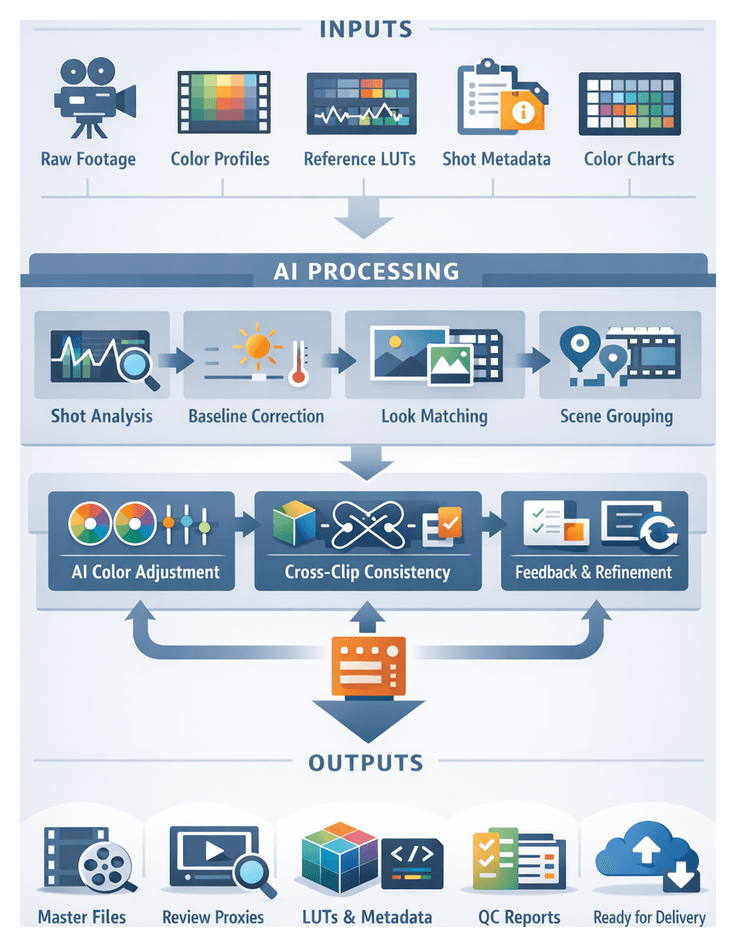
The color correction and grading stage transforms raw footage into polished visual output that fulfills creative intent, technical standards, and distribution requirements. By automating exposure matching, white balance adjustments, and stylistic treatments, AI-driven tools accelerate high-volume workflows, ensure visual continuity across scenes, and uphold brand guidelines. These systems analyze tonal ranges, skin tones, and scene dynamics to propose or apply corrective transforms, freeing colorists to focus on narrative-driven artistic decisions. This stage bridges technical compliance—meeting broadcast or platform specifications—and creative finishing that reinforces mood, emphasizes story beats, and supports a unified aesthetic.
Inputs and Prerequisites
- Raw Footage Files: Camera originals in log or raw formats (ARRI Alexa Open Gate, RED RAW, Blackmagic RAW, Sony S-Log) provide maximum dynamic range. AI engines require uncompressed or lightly compressed footage to analyze sensor data accurately.
- Color Profiles and Metadata: Embedded metadata—color space (Rec.709, Rec.2020, DCI-P3), exposure values, ISO, white balance—guides automated transforms. Consistent metadata standards enable AI models to interpret scene conditions reliably.
- Reference Looks and LUTs: Look-up tables (.cube, .3dl) or reference stills from creative briefs define target aesthetics. Systems such as Adobe Sensei and Colorlab AI leverage these references to synchronize grade characteristics across the timeline.
- Shot Logs and Scene Metadata: Detailed shot logs—including scene numbers, takes, lenses, filters—and AI-driven scene detection enable batch grouping. Accurate metadata tags link shots to their narrative context for uniform grading.
- Color Management Framework: An established pipeline (ACES or custom profile) ensures fidelity across tools. Platforms like DaVinci Resolve automatically conform footage to the chosen color space.
- File Naming and Organization: Consistent naming conventions and folder structures, applied during ingestion, allow AI grading modules to target correct clips without manual intervention.
- Color Charts and Calibration: Standardized charts (X-Rite ColorChecker, neutral gray cards) captured on set let AI algorithms calibrate exposure and white balance, reducing drift across time-coded shots.
Automated Color Matching Workflow
Shot Analysis and Baseline Correction
Each clip undergoes frame-by-frame analysis. Key steps include metadata retrieval, histogram profiling, white balance estimation, and computation of baseline transforms to normalize exposure and color temperature.
Reference Look Import and Matching
Reference assets—still images or LUTs—are ingested and analyzed. AI extracts color palettes, contrast ratios, and saturation curves, then ranks compatible looks. Colorists select desired references, which the system associates with shot groups.
Scene Segmentation and Grouping
AI identifies scene boundaries from edit metadata and clusters shots by lighting, location, and lens attributes. Tags (interior/exterior, time of day) are applied, and operators refine groupings to reflect narrative and stylistic intent.
Automated Color Adjustment
- Baseline Apply: Normalizes exposure and white balance using computed transforms.
- Look Application: Applies selected LUTs and adjusts primary color wheels, contrast, and saturation to match reference descriptors.
- Local Refinement: Semantic masks isolate faces or key objects for selective skin-tone optimization and highlight/shadow control.
- Iterative Optimization: Multiple AI passes refine transforms until color metrics align with targets.
- Batch Processing: Parallel GPU or cloud instances scale grading for high-volume workloads.
Cross-Clip Consistency and Temporal Coherence
- Shot-to-Shot Comparison: Keyframe histograms across adjacent clips are compared to minimize abrupt shifts.
- Temporal Smoothing: Parameter transitions are smoothed to ensure gradual color changes between frames.
- Global Adjustment Layer: Scene-wide modifications maintain an overarching look, counteracting minor shot-level variances.
- Consistency Reports: Dashboards highlight variance metrics and flag shots exceeding tolerances for review.
Feedback Loops and Human-in-the-Loop Overrides
- Live Previews: Real-time streaming of graded clips for immediate assessment.
- Annotation Capture: Editors annotate color adjustments directly in grading interfaces.
- Adaptive Learning: Override data and editorial notes retrain models to align future suggestions with stylistic preferences.
- Approval Gates: Automated checks verify all overrides are addressed and consistency metrics are within acceptable ranges before export.
System Integration and Data Flow
Seamless AI-driven grading depends on tightly integrated systems and a unified data ecosystem. Core components include a central asset repository feeding AI microservices, a rule-based orchestration platform, collaboration and review interfaces, and analytics dashboards.
- Asset Repository: Secure storage layer for raw footage, proxies, and project files, accessible via APIs or event triggers.
- AI Microservices: Discrete engines for shot detection, color recommendation, and metadata enrichment.
- Workflow Orchestrator: Platforms like Frame.io or cloud-native managers sequence tasks, route outputs to review interfaces, and manage dependencies.
- Review Interface: Collaborative applications for time-stamped annotations, approvals, and version control.
- Monitoring Dashboard: Real-time console reporting throughput, error rates, and model performance metrics.
Secure, API-first architectures, event-driven engines, and role-based permissions ensure elasticity, interoperability, and auditability. Infrastructure spans on-premise GPUs, cloud instances, and serverless functions provisioned dynamically based on workload.
Key AI-driven functions across the end-to-end pipeline include:
- Automated Ingestion: File validation and proxy generation via services like AWS Elemental MediaConvert.
- Intelligent Tagging: Visual analysis with Clarifai or Google Cloud Video Intelligence; speech transcription for metadata enrichment.
- Rough Cut Generation: Timeline assembly using templates in Adobe Premiere Pro powered by Adobe Sensei.
- Voiceover Scripting: Neural TTS from Descript or AWS Polly.
- Audio Enhancement: Noise reduction and leveling in iZotope RX.
- Color Grading: Batch jobs in DaVinci Resolve and Baselight.
- Review and Feedback: Version control and annotations in Frame.io or Wipster, integrated with ftrack or ShotGrid.
- Rendering and Delivery: Multi-format exports via AWS Elemental or Azure Media Services.
Outputs, Dependencies and Handoffs
Primary Deliverables
- High-bit-depth masters (ProRes 422 HQ, DNxHR, DPX, OpenEXR).
- Timeline-conformant sequences (XML, AAF, EDL).
- Review proxies (H.264, ProRes LT with timecode burn-ins).
- Lookup tables (.cube, .3d lut) capturing applied grades.
- Color chart reference stills generated by DaVinci Resolve and Colorlab AI.
Metadata Sidecars and Reference Files
- XML/JSON sidecars with per-clip transforms, lift/gamma/gain data, and keyframe information.
- Shot-level logs with timecode ranges, revision IDs, and timestamps.
- Technical QC reports summarizing histograms, scopes, and gamut compliance.
- Creative style guides pairing reference stills with notes on mood and palette.
- Checksum manifests (MD5, SHA-1) for transfer validation.
Version Control and Revision History
- Revision identifiers in filenames and metadata (e.g., shot1_Grade_v02.dpx).
- Sidecar markers indicating parent version, authoring profile, and modification date.
- Change logs summarizing incremental adjustments.
- Automated diff reports highlighting keyframe differences.
- Audit trails in production asset management systems for accountability and rollback.
Dependencies for Downstream Processes
- Consistent timecode and frame-rate metadata for sync accuracy in audio post and VFX.
- Embedded or sidecar color transforms readable by Adobe Premiere Pro and Blackmagic Design Fusion.
- Reference LUTs and log metadata for VFX matching in composites and CG renders.
- Proxy-to-master mapping tables allowing sound editors to work at low resolution.
- Scope delineation for shots requiring further manual grading versus final approval.
Handoff Protocols
- Automated exports to storage or cloud buckets via Aspera or S3 presigned URLs.
- Generation of AAF/XML project files linking to graded clips and proxies for review in Frame.io or Adobe Productions.
- Notifications through ftrack or ShotGrid to alert audio, VFX, and finishing teams.
- Integration with review portals for real-time annotations and ticketing.
- Validation scripts checking format, color space, and container compliance.
Secure and Traceable Transfers
- End-to-end encryption and access logs recording user IDs and file checksums.
- Role-based permissions in asset management systems.
- Immutable archiving of prior graded versions.
- Digital watermarking for early screenings.
- Metadata synchronization with governance frameworks for audits.
Handoff Checklist
- Verify master exports in required formats and resolutions.
- Confirm proxy generation and burn-in overlays.
- Deliver LUT files and sidecar metadata with version labels.
- Submit QC reports for color compliance.
- Send notifications with asset URLs and access credentials.
- Validate checksums for each file.
- Obtain sign-off from colorist or supervising engineer.
Governance, Quality Assurance and Continuous Improvement
Automated quality assurance validates both technical and creative criteria. AI modules scan for illegal color values, clipping, and gamut violations, generating pass/fail reports. Creative audits compare scenes against reference profiles, quantifying deviations. Detailed logs capture transform parameters, API calls, and user interactions to support traceability and compliance.
Human oversight remains vital. Structured feedback loops ensure colorists review AI suggestions, while annotation data trains models to improve stylistic alignment. Governance frameworks monitor model performance against ground-truth data, manage versioning and rollback processes, and enforce security and compliance audits. Resource usage analytics guide infrastructure optimization. Together, these practices foster continuous workflow refinement, accelerate time to market, and maintain high creative and technical standards across high-volume video projects.
Chapter 7: Enhanced Audio Processing and Sound Design
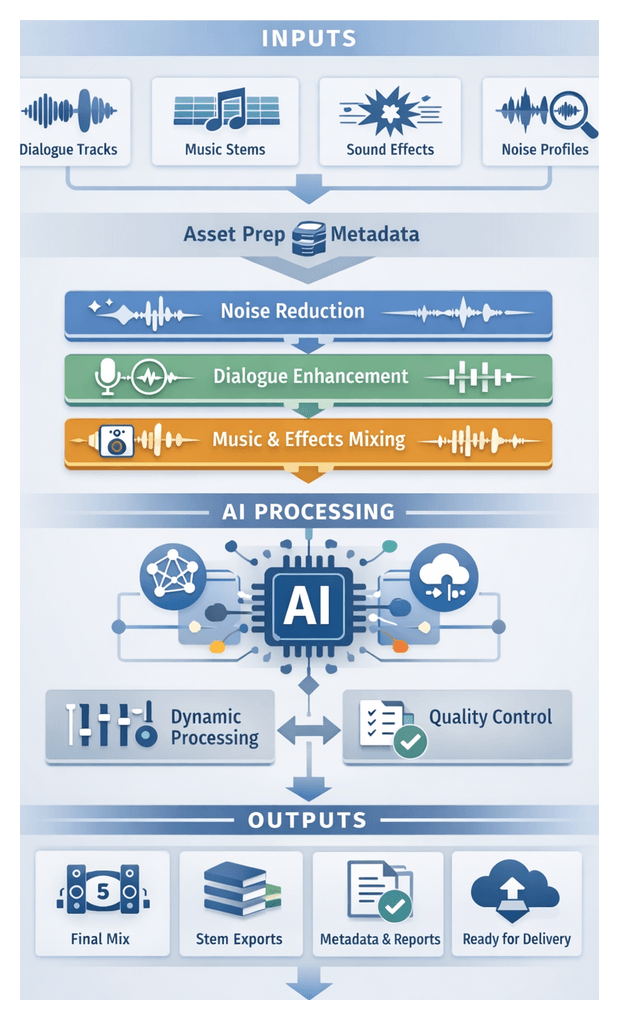
This stage establishes the foundation for delivering polished, immersive audio that complements visual storytelling. Raw dialogue, music, and effects often arrive with inconsistent levels, unwanted noise, and tonal imbalances. By leveraging AI-driven engines, editors automate noise reduction, dereverberation, and level matching, ensuring consistent loudness and spectral balance across diverse formats from stereo streaming to immersive object-based mixes. This hybrid process combines human expertise with machine precision, reducing audio bottlenecks, accelerating project timelines, and providing a controlled environment for creative experimentation with spatial treatments, stylized effects, and dynamic transitions. Embedding this stage within an AI-augmented workflow guarantees technical compliance and artistic expression, anchoring the final mix in a robust, scalable framework.
Inputs, Prerequisites, and Operational Conditions
Successful audio processing and sound design rely on well-prepared assets, metadata integrity, a configured AI toolchain, and clear creative guidelines. Establishing these prerequisites ensures AI algorithms perform optimally and creative teams apply design choices effectively.
Audio Tracks and Noise References
- Dialogue stems: multitrack exports with room tone and alternate takes, 24-bit/48 kHz aligned to timecode.
- Music stems: dry and wet versions with cue-sheet metadata for reference and balancing.
- Effects stems: foley, ambience, and design elements labeled by scene and object.
- Noise profiles: room tone samples and isolated hum, wind, or hiss footprints.
- Calibration signals: test tones and pink noise for consistent gain staging.
Metadata and Timeline Conditions
Timecode, scene markers, slate details, and channel assignments (LCR, surround, object audio) must be embedded or maintained in a synchronized database. A locked picture edit and clear versioning of track layouts enable automated scene-specific processing and minimize handoff errors.
Software Environment and AI Toolchain
Key applications and services include:
- iZotope RX for spectral repair and dialogue isolation.
- Adobe Audition with AI-driven Sound Remover and Auto-Heal.
- Avid Pro Tools with MachineControl for automated parameter adjustment.
- Auphonic for intelligent leveling and loudness normalization.
- Dolby.io APIs for immersive upmixing and metering.
- Descript Studio Sound for one-click dialogue enhancement.
Hardware and Infrastructure
- GPU-enabled workstations or cloud instances for accelerated AI models.
- Redundant high-speed storage arrays with tiered caching.
- Low-latency networking for remote collaboration.
- Backup and versioning systems for asset management.
Creative Briefs and QA Protocols
Define objectives in a sound design brief, including reference tracks, loudness targets (LUFS), ambiance levels, and compliance requirements. Establish review checkpoints, version control, and sign-off processes, delivering interim mixdowns, before-and-after comparisons, and AI processing logs for transparent quality assurance.
Workflow Overview and Core Actions
The audio processing workflow transforms raw tracks into a polished master mix through coordinated AI-driven and manual steps. Effective orchestration between engineers, AI services, and DAWs ensures dialogue, music, and effects coalesce into a cohesive soundtrack aligned with technical and creative standards.
Pre-processing and Noise Profiling
Import dialogue, music, effects, and noise samples into the DAW. Automated asset management tags each file with metadata and synchronizes timecodes. AI engines such as iZotope RX analyze noise prints to create precise profiles, while session templates configure parallel processing chains and suggest optimal gain staging.
Noise Reduction and Dereverberation
- Adaptive noise reduction with AI-driven spectral subtraction filters.
- Dereverberation using neural models to apply inverse filtering or synthesize room tone.
- Batch processing across cloud queues to distribute compute-intensive jobs.
Dialogue Enhancement and Isolation
- Speech separation via Dolby.io to isolate vocals from music and effects.
- Automated EQ and de-essing modules analyze timbre and attenuate sibilance.
- Noise gating and transient shaping to remove low-level noise and enhance consonant attacks.
Music and Effects Integration
- AI loudness meters conform music stems to standards (e.g., -23 LUFS broadcast, -16 LUFS streaming).
- Spatialization engines assign panning and depth for immersive or binaural outputs.
- Conflict detection prompts sidechain compression or notch filtering to preserve clarity.
Stem Mixing and Dynamic Processing
- Submix Creation: Automated routing compiles stems into buses for dialogue, music, and effects, with AI presets based on scene metadata.
- Multiband Compression and Limiting: Intelligent modules control peaks and maintain loudness with minimal artifacts.
- Automated Balance Checks: Mix evaluation engines compare against reference tracks and propose fader automation adjustments.
Quality Assurance and Final Mixdown
- Automated compliance testing verifies loudness and phase correlation using tools such as NUGEN Audio VisLM.
- Feedback aggregation platforms categorize stakeholder comments by severity and timestamp for prioritized fixes.
- Batch export routines render multiple channel configurations with AI encoding assistants selecting optimal bit depth and sample rates.
Deliverables are tagged with metadata and packaged with mix notes, compliance reports, and versioned session files, ready for secure transfer to rendering and distribution systems.
AI-Driven Capabilities and System Integration
AI engines automate complex tasks across the audio processing stage, reducing manual intervention and ensuring consistent, high-quality output. Integration with DAWs, asset management, and orchestration platforms enables scalable workflows and real-time collaboration.
Noise Identification and Reduction
- Machine learning models analyze silent segments to build noise profiles guiding multi-band suppression.
- Deep neural networks apply de-reverberation algorithms to recover clarity.
- Adaptive filtering adjusts parameters in real time to changing noise characteristics.
- Processed files are annotated with noise-reduction parameters and quality metrics.
Dialogue Enhancement
- Speech separation isolates vocals for focused processing.
- Tonal analysis suggests EQ curves and dynamic compression for consistent loudness.
- Neural filters remove breaths and plosives for a professional polish.
- Style matching aligns timbre across multi-speaker projects.
Adaptive Mixing and Dynamic Balancing
- Context-aware level adjustment uses scene metadata to apply mixing presets.
- Automatic ducking preserves dialogue intelligibility without manual automation.
- Spatial placement suggestions for surround and immersive formats.
- Real-time LUFS monitoring ensures compliance with distribution standards.
Supporting Systems and Roles
- DAWs host AI plugins and provide timeline context for targeted enhancements.
- Asset management platforms such as Cantemo and Dalet store files with version history and metadata.
- Workflow orchestration engines manage job queues, resource allocation, and error handling in high-volume environments.
- Collaboration interfaces integrate with Adobe Premiere Pro for real-time review and annotation.
- Quality dashboards track noise reduction performance, dialogue clarity scores, and compliance metrics for continuous improvement.
AI Governance and Continuous Improvement
- Performance monitoring captures signal-to-noise and intelligibility metrics.
- Periodic model retraining incorporates new data and sound engineer feedback.
- Version control tracks AI model updates, plugin versions, and parameter configurations.
- Human review loops validate AI outputs and annotate edge cases for future training.
- Compliance reporting documents adherence to loudness and accessibility standards.
Outputs, Dependencies, and Handoff Protocols
This stage delivers a polished audio master and associated artifacts for seamless integration with video rendering, review, and distribution. Clear dependencies, metadata embedding, and automated handoff mechanisms maintain project momentum and ensure consistent quality.
Primary Output Artifacts
- Cleaned dialogue stems (24-bit/48 kHz WAV, normalized to -24 LUFS) with AI-enhanced processing logs.
- Separated music beds and scoring elements tagged with composer and usage metadata.
- Effects and foley stems labeled by category with embedded track IDs.
- Full mixdowns in stereo, 5.1 surround, and object-based formats (uncompressed WAV and broadcast-ready MP4 audio).
- Metadata logs (XML/JSON) documenting plugin and AI model versions, loudness measurements, and checksums.
- Versioned DAW session files (e.g., Adobe Audition or Avid Pro Tools) with a change manifest.
Upstream Dependencies
- Locked picture edit exported via XML or AAF from Adobe Premiere Pro or Avid Media Composer.
- Final narration stems with style guidelines from automated voiceover scripting.
- Raw audio recordings and noise profiles from tools such as Auphonic or Descript.
- Music licensing metadata and editorial spotting sheets for transitions and effects placement.
- Technical delivery guidelines defining loudness targets, channel mapping, and format specifications.
Asset Packaging and Transfer
- Cloud upload to Amazon S3 or Google Cloud Storage with structured directory conventions.
- API-driven registration in media asset management systems with metadata payloads.
- Local network share drops monitored by file watchers to trigger encoding jobs.
Metadata Embedding and QA
- Broadcast WAV extensions embed project ID, track roles, and processing summaries.
- Automated loudness checks via NUGEN Audio VisLM and checksum validation.
- Human spot-checks for spatial coherence and artifact detection.
Notification and Tracking
- Automated alerts via email or Slack when masters are ready.
- Issue tracking in Jira or Asana for non-conformances.
Integration with Rendering
- Updated XML or AAF timeline mapping mixdowns and stems for relinking in Adobe Premiere Pro or Avid.
- Version tags in file names for clear revision history.
Best Practices
- Standardize naming conventions encoding project, sequence, stem type, date, and version.
- Automate metadata synchronization using mapping tools to populate asset management fields.
- Deploy AI engines in containers for consistent plugin versions and processing logic.
- Maintain an audit trail of AI and manual actions for troubleshooting and compliance.
- Conduct early pre-handoff checks after each processing step to catch issues proactively.
Chapter 8: Collaborative Review and Feedback Orchestration
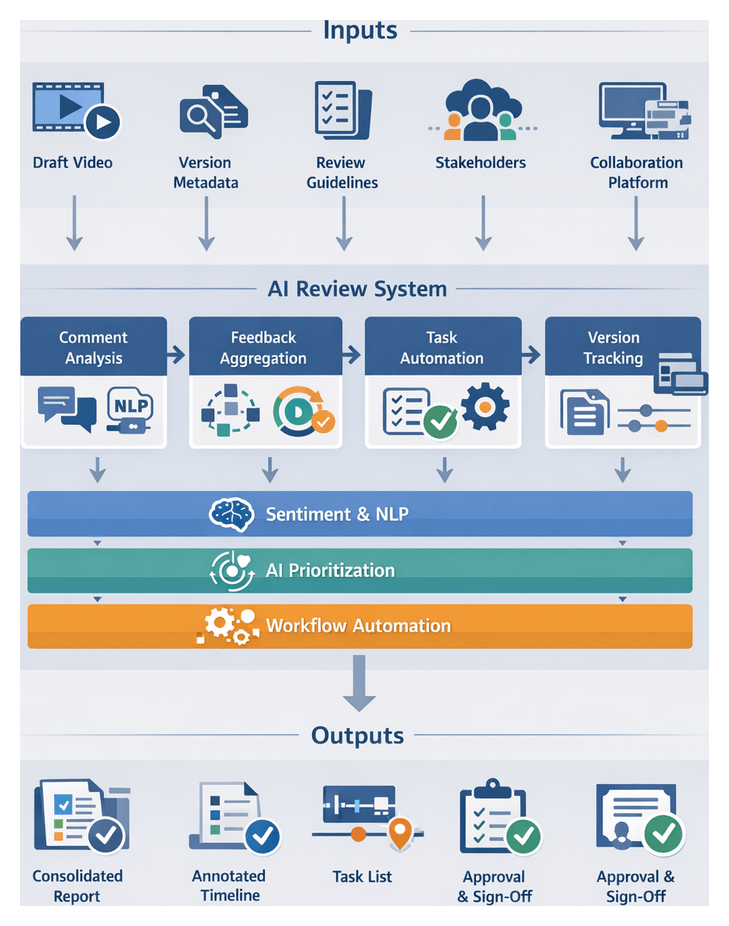
The collaborative review and feedback orchestration stage serves as the convergence point where creative intent, technical execution and stakeholder expectations align. Its objective is to validate that draft edits meet narrative goals, brand guidelines and technical standards, while engaging reviewers in a structured loop that preserves context and accelerates approvals. By formalizing inputs and workflows, teams minimize miscommunication, redundant revisions and approval delays common in high-volume video production.
Launching an AI-augmented review cycle requires a consistent set of inputs:
- Draft Video Sequences: A fully rendered or proxy edit incorporating picture, sound, transitions, graphics and initial color grading, exported at review quality (typically 720p or 1080p) for smooth streaming.
- Version Metadata: Project code, sequence name, timestamp and author information to ensure traceability.
- Review Guidelines: Checklists covering narrative coherence, pacing, branding elements, legal disclaimers and technical specs (aspect ratio, frame rate, audio levels).
- Stakeholder Roles and Permissions: Defined reviewer categories—creative directors, compliance officers, marketing leads—with preconfigured access rights in the review platform.
- Collaboration Platform Access: Credentials and links for cloud-based tools such as Frame.io, Wipster or an in-house solution integrated with the asset management system.
- Commenting and Annotation Templates: Standardized tags (visual note, audio concern, timing adjustment, brand compliance) to guide feedback categorization.
- Connectivity and Playback Environment: Verified network bandwidth, supported browsers or native apps and VPN or CDN access for distributed reviewers.
Before initiating review, teams must complete upstream stages—rough cut generation, voiceover integration, color correction and preliminary audio mixing—and synchronize metadata pipelines. The review platform must be configured with project-specific templates, workflow states and automated notifications. Security measures, including access controls and watermarking for regulated content, must be enforced. AI models for comment clustering, sentiment analysis and priority scoring require baseline training data, and reviewers need onboarding on the platform’s features and annotation conventions. Finally, version control and backup processes safeguard against data loss.
With these prerequisites in place, AI-driven tools can:
- Aggregate and cluster similar comments across reviewers and scenes.
- Score feedback by urgency and impact to prioritize critical issues.
- Predict resource allocations and timeline forecasts for revision tasks.
- Provide analytics on review cycle performance, identifying bottlenecks and error patterns.
Workflow Actions and Flow: Synchronized Review Sessions
The review workflow unfolds in synchronized phases that coordinate human actors, AI modules and production systems. Automated triggers publish the draft sequence to the shared platform and notify participants via email, in-app alerts or team chat integrations. Platforms such as Frame.io and Wipster manage user access, while AI engines retrieve metadata and pre-populate review forms with context, version numbers and outstanding tasks.
Reviewers join a synchronized playback environment where annotations—freehand drawings, highlights or text notes—are anchored to precise timecodes. An AI synchronization agent adapts video quality to prevent playback drift, and integrated speech-to-text engines transcribe voice comments. Key features include multi-user cursors, real-time sentiment flagging and bookmarks for group discussions.
AI modules analyze incoming annotations in real time, detecting repetitive issues and tagging comments using visual recognition and text analysis models. For example, object recognition flags unintended logo placements, while NLP pipelines identify keywords such as “audio sync” or “color match.”
As comments accumulate, they are consolidated into a unified feedback log. An AI prioritization algorithm ranks items based on narrative impact, technical necessity and stakeholder hierarchy. Automated clustering groups related feedback, sentiment analysis highlights urgent language and dependency mapping links tasks to asset versions or editing actions. Editors receive an AI-generated summary of top-priority items with direct links to annotated frames, enabling rapid execution.
Revision tasks are automatically assigned to specialists—video editors, sound designers or colorists—via integrations with project management tools like Asana, Jira or Trello. Each task includes timecodes, descriptions and metadata. Role-based permissions control asset modifications, and status updates trigger notifications. An AI version-comparison engine previews differences between iterations, reducing manual side-by-side checks.
Throughout this flow, the orchestration system tracks key milestones—review openings, task assignments, version uploads and deadline alerts. Custom escalation rules notify team leads of overdue items, and analytics dashboards surface metrics such as average cycle time, task completion rates and reviewer responsiveness. AI-driven insights identify recurring bottlenecks and recommend workflow optimizations for future sessions.
AI Capabilities and System Roles: Comment Aggregation and Prioritization
AI-driven comment aggregation and prioritization form the neural center of the review workflow. Natural language processing engines parse free-form text or emojis to extract entities, sentiment and intent. Services such as Google Cloud Natural Language API and IBM Watson Natural Language Understanding power entity recognition, sentiment analysis and intent detection, mapping reviewer phrases to standardized metadata tags and predefined categories.
Clustering algorithms and semantic similarity measures consolidate duplicate feedback—identifying that “audio pops at 00:02:15” and “crackle in the soundtrack around two-fifteen” refer to the same issue. Priority scoring assigns weights based on reviewer authority, sentiment intensity and frequency, while unified comment threads in the review interface reduce clutter. Version control integration re-evaluates clusters when new drafts arrive, updating status on resolved or outstanding items.
Rule-based and machine learning-driven severity analysis ranks tasks as critical, high, medium or low based on business policies and historical data. Impact estimation models detect high-risk scenarios—such as misaligned legal disclaimers—and dynamic re-prioritization adjusts queues as stakeholder focus shifts. Automated task generation in Asana, Jira or Trello includes detailed descriptions, timecodes and priority labels.
Resource matching engines recommend the optimal assignee based on skill profiles, availability and past performance, while notification and escalation protocols keep teams accountable. Progress tracking monitors task status in real time, correlating updates with comment threads to maintain a clear audit trail.
Adaptive learning components capture data on feedback resolution times, manual overrides and reviewer behavior to retrain NLP and severity models. Performance metrics dashboards highlight average cycle durations, comment reduction rates and completion statistics. Governance modules ingest changes to brand guidelines or regulations, updating intent detection and priority rules to enforce new standards.
An effective AI-powered system relies on microservices: a Comment Capture Service embedded in the review player, an NLP Processing Engine for enriching comments, a Feedback Orchestration Service for clustering and task logic, a Review Dashboard Interface for monitoring and an Analytics and Learning Module for continuous improvement. Together, these components transform fragmented feedback into a coherent, data-driven workflow that accelerates decision making and elevates review quality over successive cycles.
Outputs, Dependencies and Handoffs: Consolidated Review Reports
The culmination of collaborative review is a set of structured deliverables that guide the final edit and delivery phases. Primary outputs include:
- Consolidated Feedback Report: A versioned document summarizing all comments by timecode, priority and reviewer role, exported as PDF or CSV.
- Annotated Timeline Exports: NLE-compatible timeline files with embedded annotations, reviewer metadata and comment types.
- Issue Tracking Log: Discrete tasks categorized by severity, estimated effort and assignee, exportable to Jira or Trello.
- Version Comparison Summary: Side-by-side snapshots highlighting added, modified or removed segments between drafts.
- Approval Certificates and Sign-Off Sheets: Digitally signed PDFs recording stakeholder acceptance, timestamps and version hashes.
These outputs depend on finalized draft versions, consistent metadata naming conventions, stable collaboration platforms and correct user permissions. AI services for feedback classification, duplicate detection and priority ranking require access to pre-trained models and centralized knowledge bases. Integration points include project management platforms via APIs, digital asset management systems such as Ziflow or Frame.io, notification services like Slack, and editing suites via scripting interfaces.
Handoff mechanisms automate post-review transitions: scheduled export jobs distribute reports, API calls create tickets in trackers, annotation exports inject directly into timelines, and notification workflows deliver contextual alerts. Media files are tagged with review-status metadata to guide rendering and mixing stages. Once approved, updated assets advance to automated rendering, with metadata informing encoding parameters and watermarking rules. Review analytics feed into performance monitoring dashboards, enabling continuous refinement of review processes and AI models.
By defining clear outputs, managing dependencies and automating handoffs, teams eliminate manual bottlenecks and create a transparent, traceable stage that accelerates revisions and feeds valuable data into subsequent rendering and analytics workflows.
Chapter 9: Automated Rendering and Format Conversion
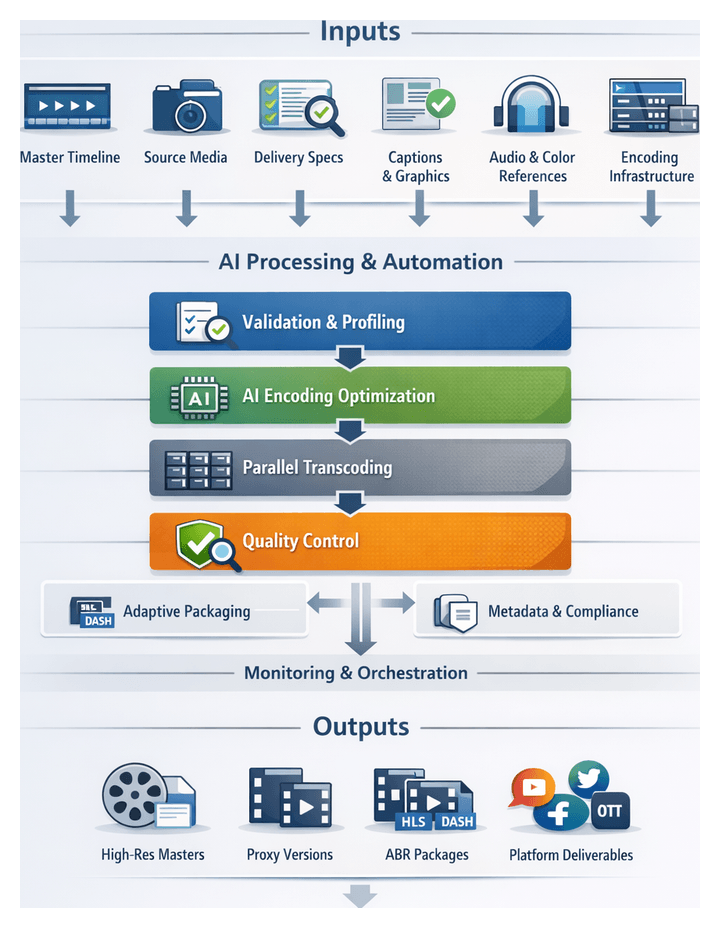
Purpose and Context
The automated rendering and format conversion stage translates the finalized, locked master timeline into a structured set of deliverables tailored to broadcast, streaming, social media and archival requirements. By formalizing rendering as a discrete, AI-driven workflow step, media organizations mitigate configuration errors, streamline version management and maintain full traceability across high-volume outputs. Adaptive encoding engines optimize visual quality and file size, automated metadata insertion ensures compliance with platform guidelines, and audit trails provide validation reports for broadcast-safe levels, closed captions and embedded metadata.
Inputs and Prerequisites
To execute AI-enhanced rendering and format conversion effectively, the following inputs and conditions must be satisfied:
- Finalized Master Timeline: Locked edit sequence with approved video, audio, effects and transitions.
- High-Resolution Source Assets: Original camera files, graphics and audio stems replacing any low-res proxies.
- Delivery Specifications: A matrix detailing target resolutions, codecs, bitrates, container types, audio channels and metadata requirements for each platform.
- Closed Caption and Subtitle Files: Validated transcripts formatted as CEA-708, SRT or WebVTT.
- Graphics and Watermarks: Approved logo overlays, dynamic titles and alpha-channel elements.
- Color and Audio References: LUTs, reference stills and calibration tracks to guide rendering parameters.
- Encoding Infrastructure: Provisioned compute resources—on-premise render farms or cloud services such as AWS Elemental MediaConvert—with GPU and CPU acceleration as needed.
- Validation Rule Sets: Compliance guidelines for broadcast-safe luminance, chrominance limits and loudness normalization (e.g., ITU-R BS.1770).
- Project Metadata Package: Asset identifiers, version numbers, project titles and descriptive tags for embedding in output files or sidecar manifests.
Essential prerequisites include stakeholder sign-off on the final cut, completion of color grading and audio mixing, quality control verification of the master timeline, infrastructure configuration and testing, installation of AI encoding tools such as FFmpeg or Adobe Media Encoder, and provisioning of sufficient network bandwidth and storage throughput.
Workflow Overview
The rendering and conversion workflow is orchestrated through asynchronous event triggers and RESTful APIs spanning the media asset management (MAM) system, encoding orchestration engine, AI optimization modules, transcoding clusters, storage gateways and monitoring dashboard. Human media operations engineers and quality assurance analysts intervene only when exceptions arise. Core steps include:
- Specification Validation: The orchestration engine receives a “ready for encoding” event with master sequence identifiers and delivery requirements, validates them against supported profiles, and resolves any discrepancies.
- Profile Generation: An AI-driven Encoding Optimizer such as Bitmovin analyzes source characteristics and delivery parameters to generate tailored codec profiles, bitrate ladders and packaging rules.
- Job Scheduling: A scheduler (e.g., Apache Airflow) assigns tasks to on-premise or cloud compute resources based on priority, expected runtime and cost constraints.
- Parallel Encoding: Transcoding engines such as Telestream Vantage, AWS Elemental MediaConvert or Encoding.com process tasks in parallel, with AI-driven error detection and automatic retries.
- Adaptive Packaging: ABR ladders are assembled into HLS and MPEG-DASH manifests, segmenting media, embedding captions and injecting metadata markers for ad insertion.
- Quality Assurance: Automated QC services perform visual and audio checks, compare outputs against reference baselines and route failures for remediation.
- Final Handoff: Approved renditions are transferred to CDNs, FTP servers or broadcast ingest points, and stakeholders receive notifications with asset URLs, checksums and QC summaries.
AI-Driven Encoding and Packaging
AI capabilities underpin every stage of encoding and packaging, embedding intelligence into codec selection, bitrate optimization, color conversion, watermarking and containerization:
- Adaptive Codec Selection: Models analyze source metadata and distribution parameters to predict optimal codec (H.264, H.265, ProRes, DNxHR) and compression settings, balancing fidelity, compute time and storage cost.
- Intelligent Bitrate Ladder Generation: Computer vision engines scan for scene complexity and motion intensity, constructing dynamic bitrate ladders and segmenting the timeline for targeted quality allocation.
- Automated Color Space and HDR Conversion: Neural tone-mapping networks detect original color encodings (Rec.709, Rec.2020, PQ, HLG) and apply precision conversions while preserving contrast and chromatic accuracy.
- Watermarking and Security: AI policies embed visible overlays and invisible forensic marks per recipient session, ensuring robustness against tampering with minimal visual impact.
- Containerization and Packaging: Packaging engines choose MP4, MOV, MXF or fragmented outputs, determine segment durations for streaming efficiency and automate DRM integration with secure key rotation.
- Resource Orchestration: Predictive autoscaling spins up cloud instances ahead of peak loads; dynamic codec offloading routes GPU-accelerated tasks via the NVIDIA Video Codec SDK; self-healing monitors node health and migrates at-risk jobs.
Automated Quality Assurance
AI-powered QA tools ensure that each output variant meets technical and editorial standards without manual review of every frame:
- Artifact Detection: Visual inspection engines identify freeze frames, macroblocking and unintended black frames.
- Audio Verification: Loudness measurements, lip-sync checks and audio drift detection enforce ITU-R BS.1770 and broadcast safe levels.
- Perceptual Metrics: Deep learning models compute VMAF, SSIM and PSNR scores against reference masters and enforce quality thresholds.
- Error Remediation: Failures trigger automated re-encoding with adjusted parameters or escalate tickets in the MAM platform for human intervention.
- Compliance Reporting: Automated logs document codec parameters, frame-level errors and metadata integrity for audit trails.
Outputs and Deliverables
- Master High-Resolution Files:
- Uncompressed or lightly compressed masters (ProRes 422 HQ, DNxHR) with audio stems and metadata sidecars.
- Proxy and Low-Resolution Variants:
- H.264 MP4 proxies for editorial review and VP9 WebM files for web previews.
- Adaptive Bitrate Packages:
- HLS and DASH manifests with segmented, encrypted renditions and sidecar caption files.
- Platform-Specific Deliverables:
- Square, vertical and short-form social media cuts with burned-in captions and watermarks.
- OTT packages adhering to Apple iTunes Store and Netflix delivery specifications.
- Logs, Reports and Thumbnails:
- Machine-readable encoding logs, checksums and QC summary reports.
- Timecode-stamped JPEG/PNG thumbnails and review watermarks for internal proofing.
Consistent naming conventions, embedded metadata tags and checksum validation ensure seamless traceability and accountability across all output variants.
Dependencies and Resource Configuration
Successful execution relies on precise alignment of inputs, tool configurations and infrastructure:
- Sequence Exports: XML, AAF or EDL files from the editing system with clip in/out points and marker data.
- Approved Assets: Color-graded masters, audio stems, voice-over and music tracks aligned to timecode.
- Delivery Specifications: Platform guidelines for resolution, aspect ratio, codecs and bitrate limits.
- Encoding Engines: Version-controlled modules such as FFmpeg or AWS Elemental MediaConvert, and on-prem GPU encoders via the NVIDIA Video Codec SDK.
- Compute and Storage: Auto-scaling render nodes in cloud or on-prem clusters and high-throughput shared storage.
- Operational Controls: Workflow rules defining retry logic, error thresholds, timeout settings and asset manifest.
Automated pre-flight checks verify asset availability, timeline integrity and delivery parameters to minimize throughput bottlenecks.
Downstream Handoffs and Distribution
Upon completion, approved renditions transition seamlessly to quality control, asset management, distribution and archival teams through API integrations, message-bus events and notification services:
- Quality Control: Automated QC jobs in Telestream Vantage initiate frame-by-frame checks; human review interfaces present flagged issues for sign-off.
- Media Asset Management: RESTful API calls upload final files and metadata to the MAM catalog, enriching entries with technical and business tags.
- Distribution Pipelines: CI/CD-style workflows push ABR packages to CDNs via webhooks; FTP/SFTP transfers deliver broadcast masters to partner servers.
- Archival and Backup: Tape libraries and cloud archive jobs enforce immutability policies and geo-redundant replication; periodic restoration tests verify data integrity.
- Notifications and Reporting: Email or Slack alerts confirm handoffs or flag exceptions; dashboards update render throughput, success rates and pending tasks.
Standardized handoff mechanisms eliminate manual transfers and miscommunication, ensuring that creative, technical and operational teams collaborate efficiently and maintain full visibility over content delivery.
Chapter 10: Performance Monitoring and Continuous Improvement
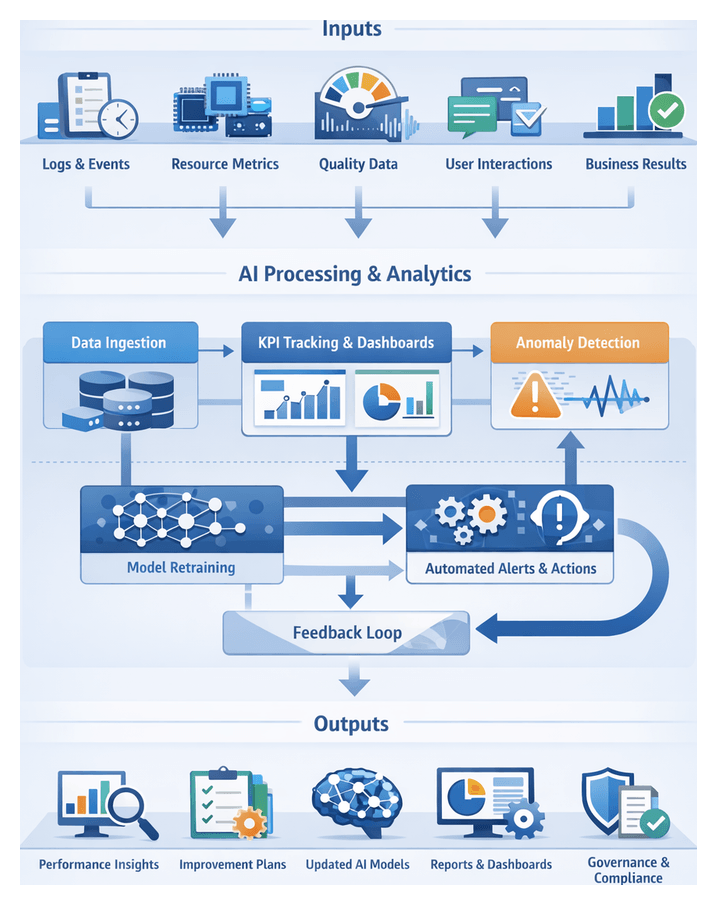
Purpose and Inputs
The performance monitoring and continuous improvement stage closes the loop on an AI-enhanced video editing workflow by transforming operational data into actionable insights. Its dual purpose is to measure efficiency, quality, and resource utilization across production cycles and to feed those measurements back into the system to refine AI models, optimize configurations, and eliminate bottlenecks. Systematic capture of workflow metrics and usage data enables media teams to make data-driven decisions, accelerate delivery, and maintain high-quality standards in high-volume environments.
Key inputs for this stage include:
- Workflow execution logs capturing timestamps for each automated and manual task
- Resource consumption records such as CPU, GPU, storage, and network utilization
- Quality of output metrics, including AI metadata tagging error rates, color accuracy deviations, and audio mixing consistency
- User interaction data, comprising editor adjustments, review session durations, and comment volumes
- Business outcome indicators like delivery lead times, client revision counts, and final approval intervals
These inputs must be collected in a consistent format, aggregated at project and enterprise levels, and stored in a centralized analytics repository. Solutions such as Datadog for infrastructure metrics and IBM Watson Studio for model performance tracking can automate data ingestion. Custom dashboards in platforms like Frame.io or Adobe Analytics provide real-time visibility into both technical and creative KPIs.
Prerequisites for reliable data collection include:
- Well-defined key performance indicators aligned with strategic objectives
- Instrumentation of each workflow component with standardized logging protocols
- Secure data pipelines enforcing access controls and privacy compliance
- Baseline measurements to establish reference points for trend analysis
- Governance policies assigning ownership for data collection and dashboard maintenance
Data Ingestion and Analytics Flow
This stage systematically captures event streams and log files from editing applications, asset management platforms, rendering engines, and collaboration tools. Streaming collectors use APIs and webhooks to ingest real-time events, while batch extract routines retrieve historical logs on a schedule. A metadata registry tags each record with project identifiers, user roles, and timestamps, ensuring traceability from raw media ingestion to final rendering.
Data is stored in time-series databases for high-frequency metrics and relational stores for structured reporting, partitioned by project, stage, and asset type. Incoming records pass through a message‐queuing layer that applies transformations such as unit conversions and code mappings. The analytics engine then computes predefined KPIs—average rough cut generation time, AI inference latency, render success rate—and runs adaptive algorithms to detect emerging patterns and anomalies.
Anomaly detection models continuously scan metric streams to flag irregularities, complemented by threshold-based rules that generate alerts for parameters like CPU utilization above 90 percent or AI error rates exceeding 5 percent. Real-time dashboards built on platforms such as Google Cloud AI Platform for model metrics and Microsoft Power BI for operational KPIs present insights with interactive filters, trend charts, and heatmaps.
Automated reports deliver daily and weekly digests via email and collaboration tools like Slack and Microsoft Teams. When metrics breach thresholds or anomalies are detected, the system creates remediation tickets in project tracking systems and assigns tasks to relevant teams. Governance meetings review these findings to prioritize process adjustments, model retraining schedules, resource scaling rules, and user training programs.
Model retraining pipelines trigger on feedback loop signals. Declines in model accuracy prompt extraction of new training data, retraining jobs, and A/B testing in staging environments. Infrastructure auto-scaling provisions additional GPU instances or container clusters via cloud orchestration tools when rendering queues exceed thresholds, while scaling down during low utilization optimizes costs.
Qualitative feedback from editorial users—comments on scene classifications or voiceover pacing—feeds into AI training pipelines as structured items guiding data labeling and model fine-tuning. Cross-functional dashboards merge quantitative metrics with annotation threads, fostering transparency and consensus on improvement initiatives. Governance workflows review change requests, risk assessments, and compliance checks before approving model or configuration updates.
Post-deployment, the analytics engine compares updated metrics to baselines to validate efficacy. Periodic process audits evaluate pipeline reliability, model accuracy, ticket resolution times, and user satisfaction. Rapid feedback loops address urgent issues within hours, retraining cycles unfold over weeks, and strategic planning occurs quarterly or annually. Microservices architecture and well-defined APIs coordinate event routing, task assignments, and secure data transfers, while audit trails capture every action for compliance and forensic analysis.
The end-to-end flow comprises:
- Ingest event and log data from all workflow stages
- Normalize and enrich records with context tags and metadata
- Store data in time-series and relational repositories
- Execute KPI computations and anomaly detection
- Visualize performance via interactive dashboards and automated reports
- Trigger alerts and create remediation tickets for anomalies
- Coordinate review sessions to approve continuous improvement actions
- Initiate model retraining pipelines with human-annotated feedback
- Deploy updated models and infrastructure adjustments through CI/CD
- Monitor post-deployment metrics to validate improvements
- Conduct periodic audits and strategic reviews
AI-Driven Insight Engines
Data Aggregation and Normalization
Platforms such as Google Cloud AI Platform and Azure Machine Learning standardize logs, usage metrics, and feedback into structured datasets. Metadata repositories capture context on project type, asset volume, and team roles.
Time-Series Analysis and Anomaly Detection
Tools like Datadog and frameworks such as Prophet detect trends and flag deviations beyond thresholds. Alerts surface via collaboration platforms like Frame.io.
Predictive Resource Forecasting
LSTM models analyze historical data to forecast compute and review capacity needs, enabling preemptive provisioning of GPU nodes and human resources.
Automated KPI Tracking and Visualization
BI tools such as Tableau and Power BI continuously update dashboards with metrics like turnaround time and render throughput.
Recommendation and Remediation Engines
Rule-based systems and reinforcement learning agents—powered by platforms like IBM Watson Studio—generate prescriptive suggestions and automatically create tickets in project management tools.
Continuous Model Retraining and Governance
MLOps pipelines retrain models on fresh data, enforce version control, and deploy new iterations through staging for A/B testing, ensuring reproducibility and compliance.
Integration with Workflow Orchestration
Insight engines interface with Apache Airflow and Azure Data Factory to trigger automated remediation playbooks and resource scaling.
Human-in-the-Loop Collaboration
Editors, colorists, and producers review AI insights alongside qualitative feedback in collaboration portals, balancing automated recommendations with creative judgment.
Security, Privacy, and Compliance
Systems implement access controls, encryption, audit logging, and privacy-preserving techniques to safeguard content and adhere to regulations.
Extensibility and Future Adaptations
Modular architectures support integration of new AI services—such as OpenAI’s GPT for narrative analysis—and connectors for emerging collaboration platforms.
Outputs, Dependencies, and Handoffs
The final stage delivers artifacts and processes that guide future production cycles, ensuring lessons learned translate into refined workflows and models.
Key Deliverables
- Improvement Roadmaps: Prioritized plans linking performance findings to actions, responsibilities, and timelines
- Updated Configuration Files: Versioned parameters for anomaly thresholds, scene detection sensitivity, and parallel rendering settings
- Retrained AI Models: New model iterations with performance benchmarks and validation reports
- Analytics Dashboards and Reports: Interactive and static summaries via platforms like Power BI and Grafana
- Governance and Compliance Artifacts: Audit trails, data usage logs, and access control reports for internal and external reviews
- Process Documentation Sets: Updated SOPs, training guides, and best-practice manuals
Dependency Mapping
- Data Sources and Quality Controls: Health checks and audits on logging streams feeding platforms such as Datadog
- Integration with BI Tools: Robust ETL processes for Power BI and Grafana with defined schemas and refresh schedules
- AI Model Training Pipelines: Curated datasets, versioned code in TensorFlow and PyTorch, and scalable compute orchestrated by Kubernetes
- Governance Frameworks: Legal reviews, security assessments, and compliance checkpoints for model updates
- Stakeholder Feedback Loops: APIs connecting collaboration platforms with analytics engines to merge qualitative and quantitative insights
- Change Management Processes: Release management, version control, notifications, rollback mechanisms, and sign-off gates
Handoff to Subsequent Stages
- Deployment of Updated AI Models: Validation through CI/CD pipelines, A/B testing, and real-time performance monitoring
- Process Optimization Teams: Implementation of configuration updates in rendering farms, API gateways, and metadata services
- Training and Enablement Workshops: Structured sessions covering new dashboard features, alert thresholds, and tagging protocols
- Governance Reviews and Audit Preparation: Submission of compliance artifacts for formal approval and audit readiness
- Continuous Feedback Integration: Real-time monitoring of updated components feeding back into analytics pipelines
- Archival of Legacy Configurations: Version-controlled repositories for rollback scenarios and historical reference
By defining clear deliverables, mapping critical dependencies, and establishing structured handoff procedures, media teams translate analytics and stakeholder feedback into tangible improvements. This disciplined approach enhances operational efficiency, elevates AI model accuracy, and ensures consistent quality and scalability in AI-driven video production.
Conclusion
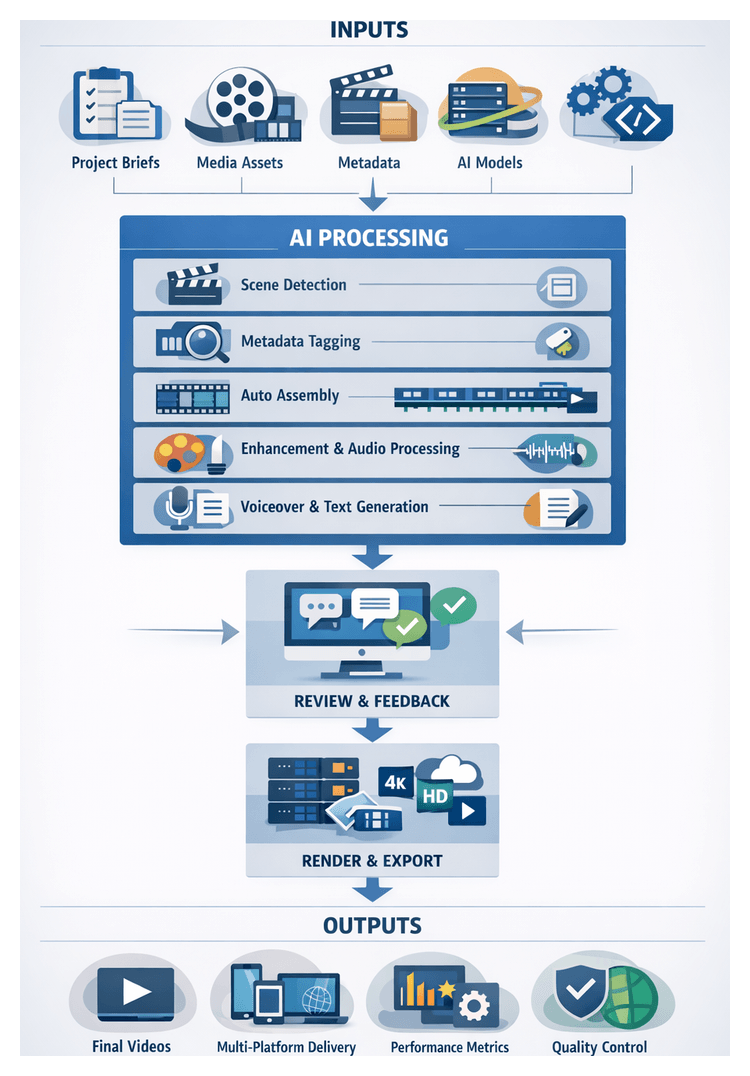
Integrated AI Editing Workflow Recap
The unified AI-driven editing workflow brings together pre-production planning, asset ingestion, metadata enrichment, automated assembly, creative enhancement, collaborative review, final rendering and performance monitoring into a single, scalable pipeline. Each stage leverages specialized AI models—ranging from scene detection and object recognition to speech transcription, color matching and audio refinement—to automate repetitive tasks, enforce consistency and accelerate turnaround. By defining clear inputs (project briefs, raw media assets, metadata schemas, AI model libraries and delivery specifications) and establishing robust prerequisites (infrastructure capacity, data and model governance, API integration frameworks and organizational alignment), this workflow ensures reliable handoffs, parallel execution paths and dynamic feedback loops. The result is a streamlined process that transforms raw footage into multi-format deliverables while maintaining quality, control and traceability throughout the production lifecycle.
Efficiency and Quality Gains
Organizations adopting AI-driven editing pipelines report substantial improvements in both operational efficiency and creative consistency. Automated modules dramatically reduce manual effort, enabling teams to focus on high-value decisions and creative direction.
Quantifying Operational Efficiency
- Automated Asset Ingestion and Organization 60–75 percent reduction in manual file sorting and format normalization when leveraging platforms such as AWS Elemental MediaConvert.
- Metadata Tagging and Search 80–90 percent faster retrieval of relevant clips through AI-powered object recognition, speech transcription and scene detection.
- Rough Cut Generation 50–65 percent acceleration of initial sequence assembly, shifting editor focus from clip selection to narrative refinement.
- Voiceover Scripting and Narration Text-to-speech models and style adaptation shorten production by up to 40 percent with tools like Adobe Sensei.
- Color Correction and Grading 55–70 percent reduction in manual balancing time when using engines such as DaVinci Resolve’s Neural Engine.
- Audio Processing and Sound Design Intelligent noise profiling and adaptive equalization yield a 60 percent improvement in cleanup and mix cycles.
- Rendering and Format Conversion 35–50 percent faster batch exports through smart encoding optimization, allowing parallel multi-platform deliverables.
Across a full production cycle, these efficiencies compound to deliver end-to-end time savings of 45–60 percent, enabling higher project throughput without proportional increases in staffing or infrastructure.
Enhancing Creative Consistency and Output Quality
- Uniform Visual Aesthetics: Automated color matching algorithms analyze histogram data and apply consistent reference looks to eliminate scene-to-scene discontinuities.
- Precision Editing: Metadata-driven sequence assembly ensures cuts align with narrative cues and creative briefs, reducing the risk of omitted story elements.
- Audio Integrity: AI-powered dialogue enhancement and dereverberation filters deliver clear speech and balanced soundscapes without manual trial and error.
- Brand Compliance: Preconfigured style guidelines embedded in AI models automatically flag deviations in logo usage, color palettes and typography during review.
- Error Reduction: System-enforced validation checks and rule-based automation minimize file misnaming, misfiling and export configuration errors, cutting rework rates from 5–10 percent to below 2 percent.
Strategic Impact of AI-Based Media Production
In an era defined by digital video growth across social, streaming and corporate channels, AI-powered workflows have become strategic assets for media organizations. By embedding intelligent automation, data analytics and cloud-native collaboration into every stage of production, teams gain competitive differentiation through faster delivery, consistent brand identity and controlled costs.
Driving Competitive Advantage Through Automation
- Scalability: Automated encoding and asset management systems accommodate content surges in global campaigns with minimal incremental staffing.
- Speed to Market: AI-powered rough cut assembly and voiceover synthesis accelerate initial draft delivery by up to 60 percent, enabling rapid iteration on market trends.
- Consistency: Intelligent presets and grading algorithms uphold uniform visual style and color fidelity across episodic or series-based content, strengthening brand continuity.
Data-Driven Creative Decisions
- Predictive Analytics: Models trained on historical data forecast timelines, identify likely revisions and recommend staff allocations to maximize throughput.
- Content Optimization: Sentiment analysis and scene composition metrics guide selection of cuts that resonate with target demographics.
- Resource Utilization: Real-time dashboards monitor GPU, CPU and storage usage across cloud and on-premises environments, enabling proactive cost control.
Supporting Systems and Infrastructure Roles
- Modular Microservices: Discrete AI functions—from speech-to-text to style transfer—are exposed via APIs for on-demand invocation by orchestration layers.
- MLOps and Model Governance: Continuous retraining pipelines use production feedback to refine AI models, while version control and audit logs uphold quality and compliance.
- Unified Collaboration Platforms: Cloud-hosted review systems, such as Frame.io, integrate comment aggregation, task assignments and role-based access controls for secure stakeholder engagement.
Business Outcomes and Value Realization
- Cost Reduction: Automated transcoding, noise reduction and tagging cut manual labor hours by up to 40 percent, delivering significant savings across large content portfolios.
- Revenue Growth: Faster delivery and data-informed creative adjustments boost viewer retention and advertising revenue on digital platforms.
- Brand Consistency: Centralized style libraries and AI-driven checks ensure every release adheres to brand guidelines, reinforcing audience trust.
- Agile Innovation: A scalable AI workflow can integrate emerging technologies—generative editing, real-time analytics and virtual production—without disrupting core operations.
Flexibility for Future Projects and Adaptations
To remain competitive, media organizations must architect AI workflows for adaptability to emerging formats, expanding teams and evolving creative demands. A modular, metadata-centric, API-first design preserves past investments, simplifies tool upgrades and scales operations without quality compromises.
Modular Pipeline Architecture
- Standardized Metadata Containers: Open formats such as XMP or MXF carry clip data, editorial notes and color profiles. New AI tagging engines map annotations into existing schemas, seamlessly plugging into downstream modules.
- API-First Integration: Services Frame.io expose endpoints for asset ingestion, metadata retrieval, render submissions and status reporting, ensuring that upgrades do not break orchestration logic.
- Plugin and Adapter Layers: Lightweight connectors for editing environments such as Adobe Premiere Pro or DaVinci Resolve isolate core orchestration from tool-specific changes.
Configurable Templates and Profiles
- Delivery Profiles: Catalogues of encoding specifications—bitrate, codec, resolution and container format—enable rapid support for new platforms by adding profile entries.
- Grading and Sound Presets: LUT packages and audio stem balance files, accompanied by JSON manifests, allow downstream systems to apply consistent looks or revert to raw footage as needed.
- Review Workflow Configs: Centralized definitions for role-based notifications, comment categories and approval thresholds adapt review processes without recoding interfaces.
Abstracted Handoffs and Versioning
- Versioned Asset Manifests: Each file is tracked with a unique identifier, checksum and version number. Alternative edits or grades increment versioning, enabling render queues and review dashboards to access specific or latest revisions.
- Dependency Graphs: Directed graphs capture relationships among assets, sequences and effects. When formats change, only affected nodes are reprocessed, avoiding full project rebuilds.
- Validation Reports: Machine-readable reports detail errors, warnings and automated fixes. Downstream modules enforce prerequisites by reading these reports before processing assets.
Scalable Team Collaboration
- Role-Based Access Outputs: Metadata tagging engines emit access control manifests defining which user groups can modify or approve annotations, ensuring governance across editorial suites.
- Audit Logs and Change Histories: Every handoff generates timestamped log entries—system or user-initiated—with change context, facilitating quality audits and compliance reviews.
- Localization and Format Adapters: Rough cut and voiceover outputs include language codes and regional flags. Downstream systems route variants automatically to localized teams or platform-specific render queues.
Incorporating Emerging AI Innovations
- Service Discovery and Registration: The orchestration layer queries a registry of available AI services—transcription engines, object recognition models, style transfer modules—and maps them to functional roles. New models register themselves and receive tasks without choreography changes.
- Model Abstraction Interfaces: Generic interfaces for tasks (e.g., detectScenes(input): outputMetadata) ensure that swapping engines does not affect calling code, with semantic versioning managing dependencies.
- Continuous Retraining Pipelines: Human review feedback and performance metrics feed back into retraining workflows. Updated weights and bias parameters are versioned and deployed as new service instances, driving ongoing improvements.
Future-Ready Integration with Distribution Systems
- Routing Rules and Webhooks: Completed multi-format deliverables trigger webhooks to distribution endpoints or DAM platforms. Payloads include file URLs, checksums, format descriptors and compliance flags.
- Metadata-Driven Publishing: Distribution systems consume embedded metadata to select correct video variants, subtitles and audio tracks for each target, eliminating manual exports and reducing versioning errors.
- Archival Manifests: Projects emit archival packages—bundles of source footage, project files, LUTs and metadata indexes—along with human- and machine-readable manifests for cold-storage ingestion and future reuse.
By consolidating AI capabilities, modular services and standardized outputs into a cohesive workflow, media organizations achieve flexibility, scalability and sustained competitive advantage. This adaptable foundation empowers teams to integrate new tools, respond to dynamic project demands and deliver high-quality content efficiently—today and in the years ahead.
Appendix
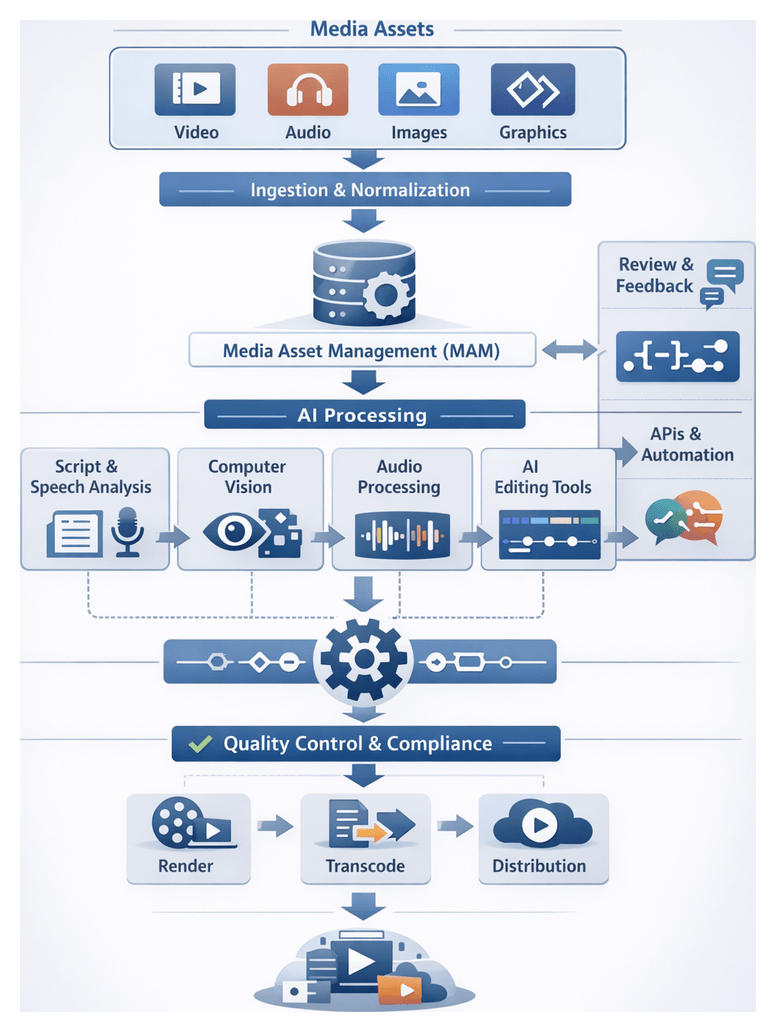
Core Workflow Components and Terminology
A robust AI‐driven video production pipeline relies on shared vocabulary to coordinate ingestion, processing, editing and delivery. Clear definitions enable seamless integration of media management systems, AI services and editorial tools.
- Asset: Any media item—video clip, audio file, graphic or still image—ingested into the system.
- Media Asset Management (MAM): Central repository with APIs for ingestion, indexing, metadata updates and secure distribution.
- Ingestion: Automated import of raw assets into the MAM, including checksum validation, format detection and initial metadata tagging.
- Normalization: Conversion of source formats into mezzanine files for high-quality masters and proxy files for efficient editing and review.
- Proxy: Low-resolution copy used to accelerate editing and remote review.
- Orchestration Engine: Workflow controller that sequences tasks, manages dependencies and triggers AI or cloud services.
- Microservice: Independent component performing a specific function—transcoding, transcription—communicating via APIs or messaging queues.
- Event-Driven Architecture: Design where services respond to events (file arrival, task completion) for scalable, asynchronous processing.
- API: Interface through which systems exchange data and commands—linking MAM, AI engines, editing platforms and review tools.
Metadata and Tagging
Consistent, rich metadata drives AI analysis, semantic search and automated assembly. Controlled vocabularies and validation ensure uniform interpretation.
- Metadata: Descriptive, technical or administrative information—scene numbers, dialogue transcripts, usage rights.
- Taxonomy: Hierarchical classification system standardizing metadata fields and values.
- Sidecar File: Separate JSON or XML file storing extended metadata linked to an asset.
- Automatic Tagging: AI models—computer vision, speech-to-text, NLP—generate labels, scene boundaries and transcripts.
- Semantic Search: Leveraging metadata and AI embeddings to find assets by meaning rather than exact keywords.
- Confidence Score: AI-provided metric indicating tag accuracy, guiding human-in-the-loop validation.
AI Capability Concepts
- Script Parsing: NLP engines extract scene structure and dialogue from scripts, generating shot lists and timing markers.
- Computer Vision: Models detect objects, faces, logos and transitions for automated tagging and segmentation.
- Speech-to-Text: Services transcribe dialogue and ambient sounds into time-coded transcripts for subtitles and search.
- Rough Cut Assembly: Algorithms select, trim and sequence clips based on script cues and metadata.
- Text-to-Speech: Neural synthesis generates voiceovers from text, controlling tone and prosody.
- Color Grading AI: Engines recommend exposure, white balance and stylized looks using reference histograms and LUTs.
- Audio Enhancement: AI filters perform noise reduction, dereverberation and dynamic leveling.
- Comment Aggregation: NLP clusters reviewer annotations and prioritizes feedback by severity.
- Insight Generation: Analytics engines track metrics—turnaround time, error rates, resource usage—to recommend optimizations.
Quality Control and Compliance
- Quality Control (QC): Automated or manual checks for codec compliance, color gamut, audio loudness and artefacts.
- LUT (Look-Up Table): File encoding color transformations for consistent creative looks.
- Broadcast Safe: Legal luminance and chrominance ranges for broadcast compatibility.
- Loudness Normalization: Adjusting audio to standards like EBU R128 or ATSC A/85.
- Closed Captioning: Embedding or side-loading timed text files (SRT, TTML) for accessibility and compliance.
- Watermarking: Visible or invisible marks for copyright protection.
Delivery and Distribution
- Rendering: Exporting the final timeline into video and audio files with specified codecs and containers.
- Transcoding: Converting media to different codecs or containers to create output variants.
- Adaptive Bitrate (ABR): Multi‐resolution renditions packaged for HTTP streaming (HLS, DASH).
- HLS: Apple’s HTTP Live Streaming protocol delivering segmented media and manifests.
- DASH: MPEG-DASH standard for adaptive streaming with manifest files.
- Container: File format—MP4, MOV, MXF—bundling video, audio, subtitles and metadata.
- DRM: Encryption and licensing systems for content protection.
Collaboration and Governance
- Non-Linear Editor (NLE): Applications—Adobe Premiere Pro, Avid Media Composer—that support timeline editing and AI plugins.
- Review Platform: Cloud services—Frame.io, Wipster—for playback, annotations and approvals.
- Human-in-the-Loop: Workflow design where AI outputs are validated or refined by experts.
- Version Control: Tracking changes to assets, projects and configurations with Git and Git LFS.
- Audit Trail: Immutable log of ingests, model runs and approvals for transparency and compliance.
- Change Management: Formal processes for modifying specifications, templates or models with documented approvals.
- Service-Level Agreement (SLA): Performance targets—turnaround times, error rates—defining expectations.
Monitoring and Continuous Improvement
- Key Performance Indicator (KPI): Metrics—rough cut time, tagging accuracy, render success rate—assessing workflow health.
- Anomaly Detection: AI models that flag deviations in performance, triggering alerts.
- Predictive Analytics: Forecasting resource needs—compute, storage, review capacity—based on historical data.
- Feedback Loop: Using outcomes to retrain AI models and refine process guidelines.
- Dashboard: Real-time visualization of metrics, alerts and trends—Power BI, Grafana.
- MLOps: Practices for managing AI model lifecycles—from training and validation to deployment and monitoring—using platforms like Google Cloud Vertex AI.
Mapping AI Features to Workflow Stages
Aligning AI capabilities with each stage of production clarifies integration needs and optimizes investment.
Pre-Production Planning
- Script parsing and scene breakdown—OpenAI GPT-4, IBM Watson NLU, ScriptBook.
- Automated shot list generation by matching narrative elements to visual templates.
- Resource and schedule optimization—monday.com or Celoxis.
- Creative parameter extraction—Adobe Sensei.
- Meeting transcription and action-item capture—Otter.ai.
Automated Asset Ingestion
- Format detection and transcoding—AWS Elemental MediaConvert, Amazon Elastic Transcoder.
- Integrity validation with checksums and error detection algorithms.
- Folder structure and naming enforcement via rule engines.
- Technical metadata extraction using file-analysis services.
Intelligent Metadata Tagging and Search
- Scene and shot boundary detection—Google Cloud Video Intelligence API.
- Object, face and logo recognition—Amazon Rekognition, Google Cloud Vision, Clarifai.
- Speech transcription and sentiment tagging—Google Cloud Speech-to-Text, AWS Transcribe, Azure Video Indexer.
- Semantic search and faceted navigation using Elasticsearch or Solr.
AI-Powered Rough Cut Generation
- Clip selection and relevance ranking based on metadata and context.
- Automated trimming using ML models trained on professional edit patterns.
- Story arc alignment—OpenAI GPT-4 for narrative structuring.
- Timeline construction—Adobe Premiere Pro with Adobe Sensei, Blackbird TrimInterface, Descript, ScriptSync by Avid.
Automated Voiceover and Narration
- Script adaptation—OpenAI ChatGPT.
- Text-to-speech synthesis—Amazon Polly, Google Cloud Text-to-Speech, Azure Text-to-Speech, ElevenLabs Voice Lab.
- Voice style transfer and overdub—Descript Overdub.
- Phoneme alignment for lip-sync metadata.
AI-Driven Color Correction and Grading
- Exposure and white balance correction via histogram analysis.
- Reference look matching—DaVinci Resolve Neural Engine.
- Shot grouping and grade propagation.
- Semantic masking for local adjustments.
Enhanced Audio Processing
- Noise reduction—iZotope RX.
- Dialogue isolation, dereverberation and adaptive EQ.
- Spatial audio and object-based sound design.
Collaborative Review and Feedback
- Real-time annotation aggregation—Frame.io, Wipster.
- Comment classification and priority scoring via NLP.
- Automated task assignment—Jira, Asana.
- Version comparison and resolution tracking.
Automated Rendering and Delivery
- Adaptive bitrate ladder generation based on scene complexity.
- Dynamic codec selection—Bitmovin Encoding, Telestream Vantage.
- HLS/DASH packaging with DRM workflows.
- Automated QC and compliance checks.
Performance Monitoring and Continuous Improvement
- Anomaly detection—Datadog.
- Predictive resource forecasting.
- KPI dashboards—Power BI, Grafana.
- Automated retraining pipelines triggered by performance drift.
Handling Diverse Inputs and Edge Cases
High-volume pipelines must manage varied source formats, metadata issues, live broadcasts, specialized content and unexpected scenarios. Configurable rules, fallbacks and human-in-the-loop interventions ensure resilience.
Diverse Formats and Normalization
Ingestion engines detect and classify file formats, codecs and metadata profiles to determine normalization steps. Tools like Amazon Elastic Transcoder or FFmpeg convert RAW cinema files to mezzanine formats and up-res low-resolution clips. Fallback routines extract header metadata and generate proxies for manual review. AI-powered motion estimation reconciles variable frame-rate footage, preventing misalignments in color grading and narration synchronization.
Incomplete or Corrupted Metadata
Validation routines compare incoming metadata against taxonomies and schemas, flag anomalies and infer missing values through pattern analysis. Assets with low confidence scores appear in review dashboards for human curation. Corrected examples feed back into model training, improving future inference accuracy.
Workflows for Live and Near-Live Editing
Real-time pipelines integrate multi-camera feeds into AI engines that detect key moments—speaker changes, applause or graphics—triggering automated rough-cut updates. Automated subtitling and translation produce captions with minimal latency. Buffering, error concealment and dynamic color balance ensure continuous processing despite network or lighting variations. Rapid review platforms support stakeholder sign-off before broadcast or online distribution.
Custom Pipelines for Specialized Content
Modular AI components can be enabled per genre. Sports workflows use motion analysis to generate highlight reels and overlays. Documentaries leverage facial recognition and sentiment models to assemble interview extracts. Product demos employ computer vision to isolate product close-ups and generate call-out graphics. Parameterized templates and taxonomies accommodate genre-specific tags and transitions without altering core infrastructure.
Scaling Episodic and Long-Form Productions
Automated templates maintain consistent episode structure—intros, recaps, credits—and tag recurring elements. Color grading and audio mixing apply uniform looks and levels across episodes. Template updates and batch reprocessing accommodate mid-season style changes or sponsor revisions, minimizing re-rendering costs through metadata versioning.
Integrating External Stakeholder Feedback
Intelligent feedback ingestion tools extract text from PDFs, emails or verbal notes, using NLP to map comments to timecodes and review categories. Keyword matching between transcripts and comments approximates segment locations when timecodes are absent. Legal compliance annotations trigger AI-driven masking or redaction workflows, ensuring all input is captured and addressed.
Compliance and Regional Variations
Localization modules automate subtitle translation with custom glossaries and generate dubbed audio with native intonation. Lip-sync algorithms align phonemes to lip movements. Compliance bots scan for banned symbols or age-restricted content, flagging or masking segments. Regional rulebooks and expert review workflows handle dialectal and cultural variations.
Fallback Strategies for AI Limitations
When models underperform—due to novel data or challenging conditions—workflows detect low confidence thresholds and revert to manual processes or template-only modes. Color grading engines apply baseline transforms when reference matching fails. Every fallback is logged for prioritizing model improvements.
Adapting to Emerging Tools and Standards
Containerization with Docker and orchestration via Kubernetes enable integration of new AI services. Feature flags and canary deployments allow safe previews of experimental models. Adopting standards—IMF for deliverables, SMPTE ST 2110 for live streaming—requires only service-level updates without rewriting workflow logic.
Continuous Adaptation and Future-Proofing
Ongoing measurement, iterative enhancements and a culture of experimentation embed resilience. Dashboards inform priorities, governance frameworks validate changes, and training programs mitigate model drift. This approach prepares pipelines for future demands—augmented reality, interactive video or personalized AI-driven experiences—while maintaining speed, quality and creative control.
AI Tools Index and Further Resources
AI Tools Mentioned
- Adobe Sensei Adobe’s AI and machine learning framework powering automated creative features such as content-aware editing, color matching and metadata tagging within Adobe Creative Cloud applications.
- Frame.io A cloud-based collaborative review and approval platform enabling real-time playback, annotation and version control for video projects.
- Wipster A video review and collaboration tool that provides time-coded comments, approval workflows and task assignment for editorial teams and stakeholders.
- Asana A project management platform used to track tasks, deadlines and approvals across production and post-production workflows.
- monday.com A work operating system that coordinates resource scheduling, task dependencies and team collaboration for media production projects.
- Celoxis An AI-augmented project management solution offering automated resource allocation and timeline optimization for complex shoot and post schedules.
- Otter.ai An AI-powered transcription service that captures meeting notes, speaker identification and action items during pre-production kickoff sessions.
- ScriptBook A predictive analytics tool for script analysis and story breakdown, supplying scene structure and metadata for shot list generation.
- OpenAI ChatGPT A large language model used for natural language processing tasks such as script refinement, metadata taxonomy expansion and narrative alignment.
- Amazon Polly AWS’s neural text-to-speech service that synthesizes high-quality voiceover tracks in multiple languages and emotional styles.
- Azure Text-to-Speech Microsoft’s cognitive service for converting text into lifelike speech, supporting custom voice styles and pronunciation tuning.
- Google Cloud Text-to-Speech Google’s API for generating natural-sounding speech from text, with a range of voices and language options.
- DaVinci Resolve Neural Engine Blackmagic Design’s AI module within DaVinci Resolve for automated color matching, face recognition and shot consistency across sequences.
- iZotope RX An AI-powered audio repair suite offering spectral noise reduction, dereverberation, dialogue isolation and adaptive equalization tools.
- Telestream Vantage A media processing platform with AI-driven encoding optimization, format conversion and quality control for high-volume rendering.
- AWS Elemental MediaConvert A cloud-native video transcoding service that automates format conversion, watermarking and adaptive bitrate packaging at scale.
- Google Cloud Video Intelligence API Google’s computer vision service for scene detection, object recognition and content metadata generation from video streams.
- Amazon Rekognition AWS’s deep learning service for image and video analysis, including facial recognition, object detection and text extraction.
- Google Cloud Vision A vision AI service that performs image labeling, OCR, landmark detection and logo recognition to enrich metadata tagging.
- Google Cloud Speech-to-Text Google’s transcription API that converts audio streams into accurate text transcripts with word-level time codes.
- AWS Transcribe An automatic speech recognition service that produces text transcripts, speaker labels and sentiment analysis for audio assets.
- Azure Video Indexer Microsoft’s integrated AI service for extracting insights from video content, including transcription, translation and topic modeling.
- Clarifai An AI platform offering custom computer vision models for object detection, scene classification and brand logo recognition.
- Blackbird TrimInterface An AI-assisted editing tool that automates rough cut assembly using metadata and script alignment.
- Descript A collaborative audio-video editor featuring AI-driven transcription, overdub voice cloning and scene recomposition.
- ElevenLabs Voice Lab A neural voice synthesis platform for creating custom voice models and generating highly expressive narration tracks.
- ScriptSync by Avid A tool for synchronizing scripts to footage using speech recognition, streamlining dialogue-based editing.
- AWS Step Functions A serverless orchestration service that coordinates AI-driven workflows via state machines and event triggers.
- Apache Airflow An open-source platform for programmatically authoring, scheduling and monitoring workflows, including media pipelines.
- Docker and Kubernetes Containerization and orchestration technologies used to deploy AI services and scale encoding clusters reliably.
- Git and Git LFS Version control systems for managing configuration files, AI model code and project documentation.
Additional Context and Resources
- Academy Color Encoding System (ACES) A standardized color management framework ensuring consistent color workflows from camera capture through final delivery.
- ITU-R BS.1770 and EBU R128 International standards for loudness measurement and normalization in broadcast and streaming audio.
- Final Draft FDx A machine-readable script format used for automated parsing and metadata extraction by AI planning tools.
- Broadcast Wave Format (BWF) An extension of the WAV format supporting embedded metadata for precise audio asset identification.
- IPTC and XMP Metadata Standards Industry schemas for embedding descriptive and technical metadata within media files to support search and interoperability.
- JSON-LD and XML Schemas Structured data formats used to exchange metadata between AI services, asset management systems and collaboration platforms.
- HLS and MPEG-DASH Specifications Adaptive streaming protocols for delivering multi-bitrate video to web and mobile clients.
- Dolby Atmos and Immersive Audio Object-based surround sound format supported by AI-powered spatialization and upmixing engines.
- GitOps and MLOps Practices Methodologies for versioning, deploying and maintaining AI models and infrastructure configurations in a reproducible manner.
- Security and Compliance Frameworks (SOC 2, ISO 27001, GDPR) Industry regulations and standards guiding data protection, access controls and audit logging for AI-driven media workflows.
- OpenAI GPT-4 A state-of-the-art large language model used for advanced script adaptation, metadata generation and intelligent feedback summarization.
- Google Cloud Vertex AI A managed service for training, deploying and monitoring machine learning models used throughout the video production pipeline.
The AugVation family of websites helps entrepreneurs, professionals, and teams apply AI in practical, real-world ways—through curated tools, proven workflows, and implementation-focused education. Explore the ecosystem below to find the right platform for your goals.
Ecosystem Directory
AugVation — The central hub for AI-enhanced digital products, guides, templates, and implementation toolkits.
Resource Link AI — A curated directory of AI tools, solution workflows, reviews, and practical learning resources.
Agent Link AI — AI agents and intelligent automation: orchestrated workflows, agent frameworks, and operational efficiency systems.
Business Link AI — AI for business strategy and operations: frameworks, use cases, and adoption guidance for leaders.
Content Link AI — AI-powered content creation and SEO: writing, publishing, multimedia, and scalable distribution workflows.
Design Link AI — AI for design and branding: creative tools, visual workflows, UX/UI acceleration, and design automation.
Developer Link AI — AI for builders: dev tools, APIs, frameworks, deployment strategies, and integration best practices.
Marketing Link AI — AI-driven marketing: automation, personalization, analytics, ad optimization, and performance growth.
Productivity Link AI — AI productivity systems: task efficiency, collaboration, knowledge workflows, and smarter daily execution.
Sales Link AI — AI for sales: lead generation, sales intelligence, conversation insights, CRM enhancement, and revenue optimization.
Want the fastest path? Start at AugVation to access the latest resources, then explore the rest of the ecosystem from there.